Supergrow

LinkedIn® Engagement

Help employees build the right relationships on LinkedIn®

Give each executive, seller, and expert a focused list of people and pages that matter. They review recent posts, write or shape a comment in their own voice, and choose every action.

Try for 7 days | Cancel anytime

How it works

A focused LinkedIn® engagement habit in three steps.

Search for a profile
+
+
linkedin.com/in/…

1. Choose who matters

Build lists around prospects, customers, partners, peers, industry voices, or company pages. Add a profile URL, upload a CSV, or select relevant people from a LinkedIn® post’s comments.

Refresh postsUpdated 2h ago

2. Open a focused daily feed

See recent posts from the people and pages on that list in one clean stream. Employees start with the relationships they chose instead of searching the main feed.

Write your comment, or generate one with AI…
Like the post tooLikeSkipComment

⌘/Ctrl+Enter comment · S skip · L like · Esc exit

3. Review and engage one post at a time

Use Focus Mode to write a comment, generate an optional starting point, like the post, skip it, or move on. The employee reviews and triggers every action.

Employee-controlled by design

Every like and comment starts with the employee.

Engage uses the authorized LinkedIn® connection and official API. Nothing is sent until the employee chooses the action and clicks.

Supergrow is a LinkedIn® Verified Partner.

Official LinkedIn® API and OAuth

Each person connects their own account through OAuth. There is no LinkedIn® password to hand over and no browser extension to install.

One click, one action

No pods, bots, auto-likes, or comments running in the background. Employees decide who to engage with and what to say each time.

For employee advocacy and social selling

Help every team member engage with their ICP

Turn a broad request to engage more into a clear, repeatable task with focused lists, recent posts, voice-aware comment support, and employee control.

Build a list around actual relationship goal

Create focused lists for target accounts, customers, partners, peers, event speakers, industry voices, or relevant company pages. You can also start from a high-signal LinkedIn® post and select the people already in that conversation.

  • Add profiles or company pages by URL
  • Upload a CSV when the team already has a target list
  • Pull names, headlines, and photos from a post’s commenters
  • Keep separate lists for different roles, markets, or relationship goals
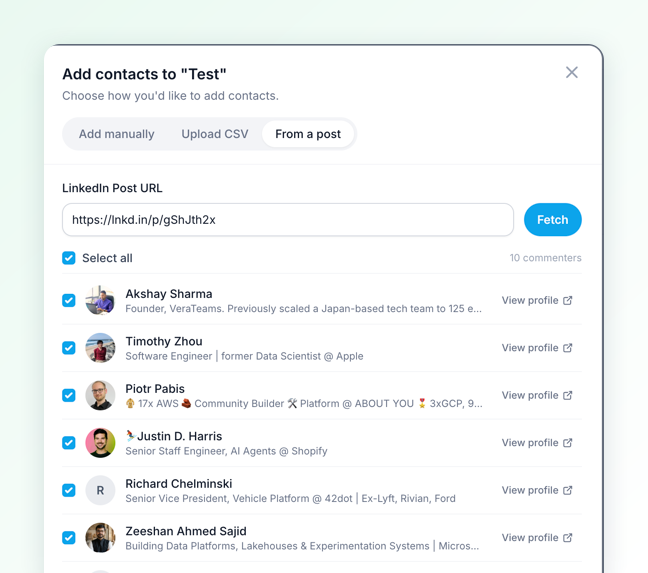
Supergrow add-contacts dialog with the From a post tab open, listing commenters with their headlines and a checkbox each

Open the target list, not the main feed

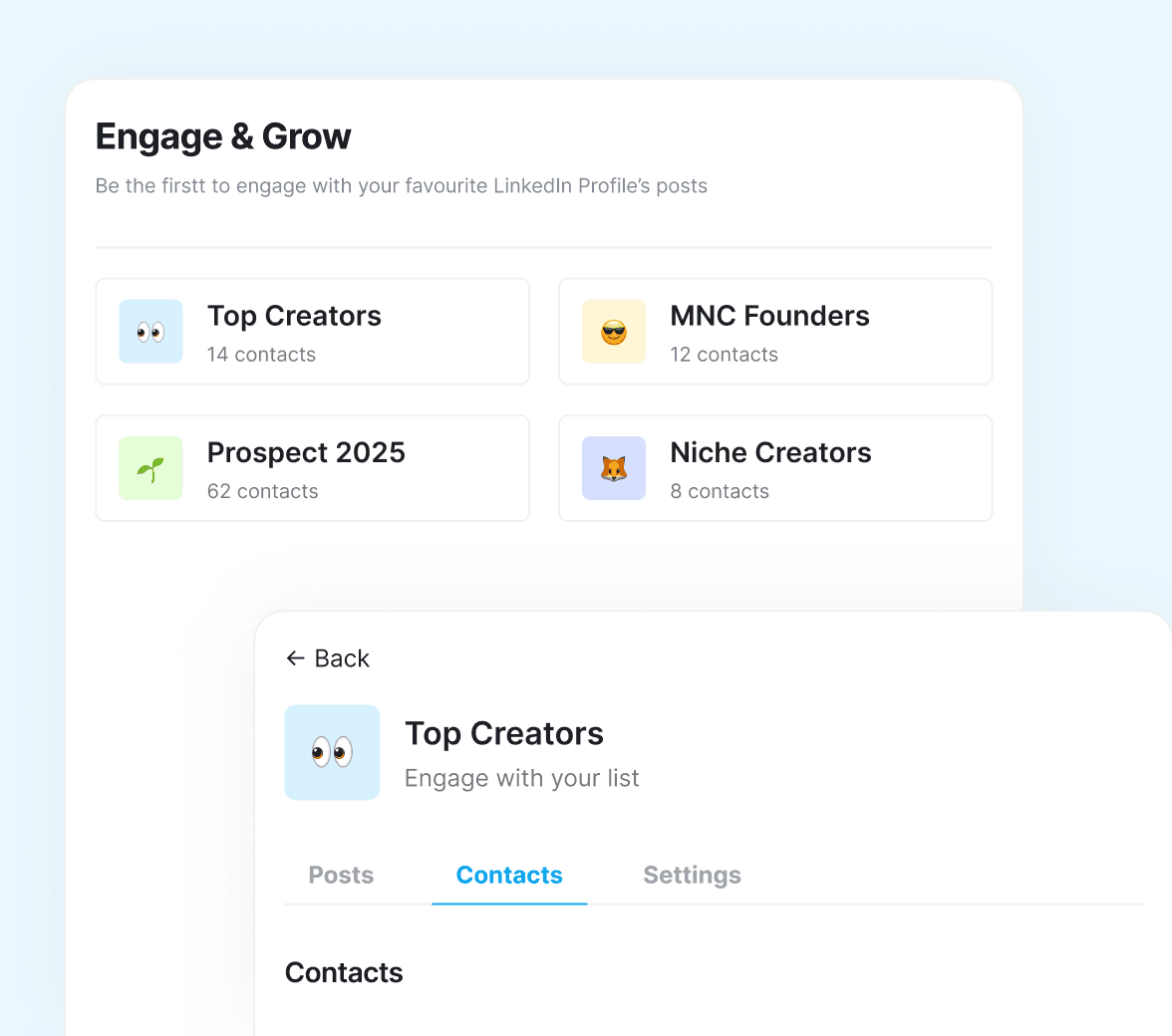
Each list becomes a focused stream of recent posts from the people and pages the employee chose. The next useful conversation is easier to find without wandering through the LinkedIn® timeline.

  • Recent posts from each selected profile or page
  • A clean daily view built around intentional relationships
  • No ads or unrelated timeline content competing for attention
Supergrow Engage & Grow panel with Top Creators, MNC Founders, Prospect 2025, and Niche Creators lists

Focus Mode, one post at a time

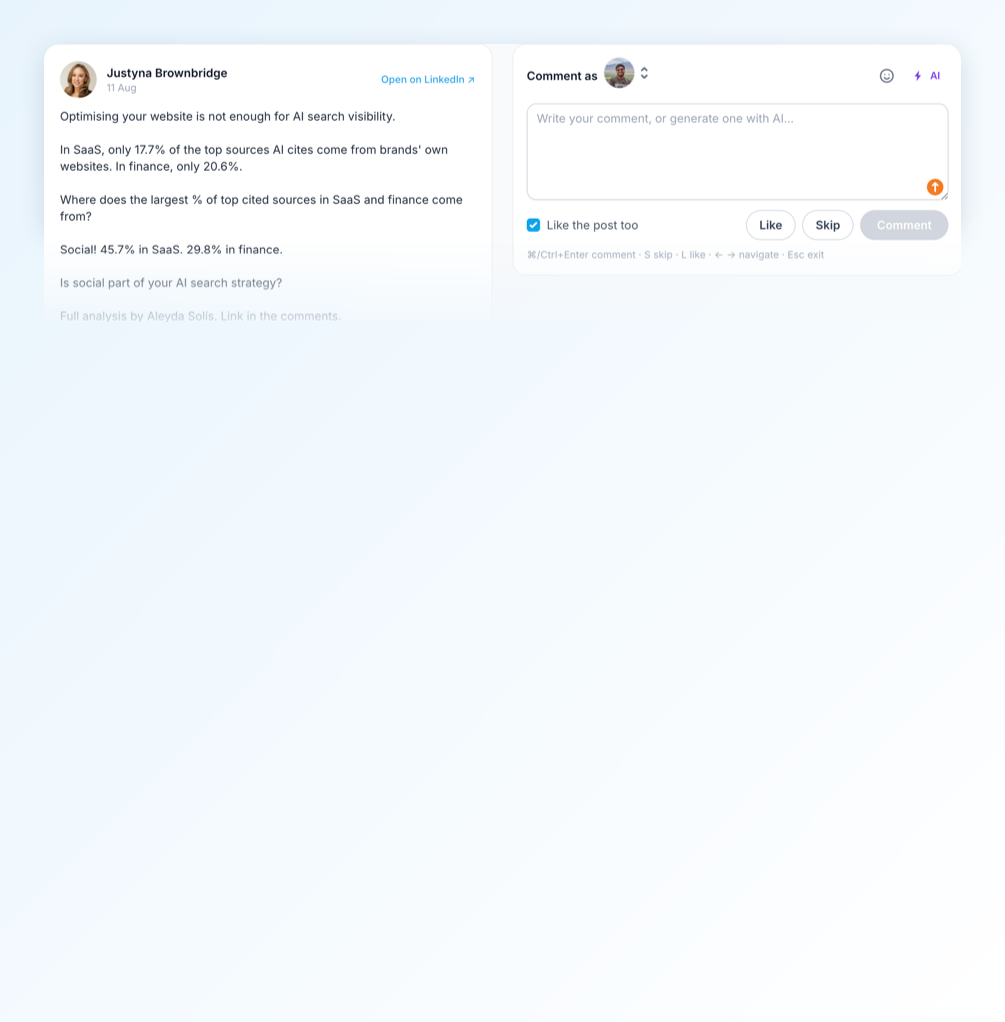
Focus Mode places the post beside the comment box and shows progress through the list. Employees can write, like, skip, or move to the next post without opening several tabs.

  • Write the comment or generate an optional draft
  • Choose whether to like the post before moving on
  • Use keyboard controls to skip, like, comment, and navigate
  • Engage as a personal profile or an authorized company page
Supergrow Focus Mode with a LinkedIn post on the left and a comment box on the right, a like the post too checkbox, and the keyboard shortcuts for skip, like, and comment

AI-assisted comments in each employee’s voice

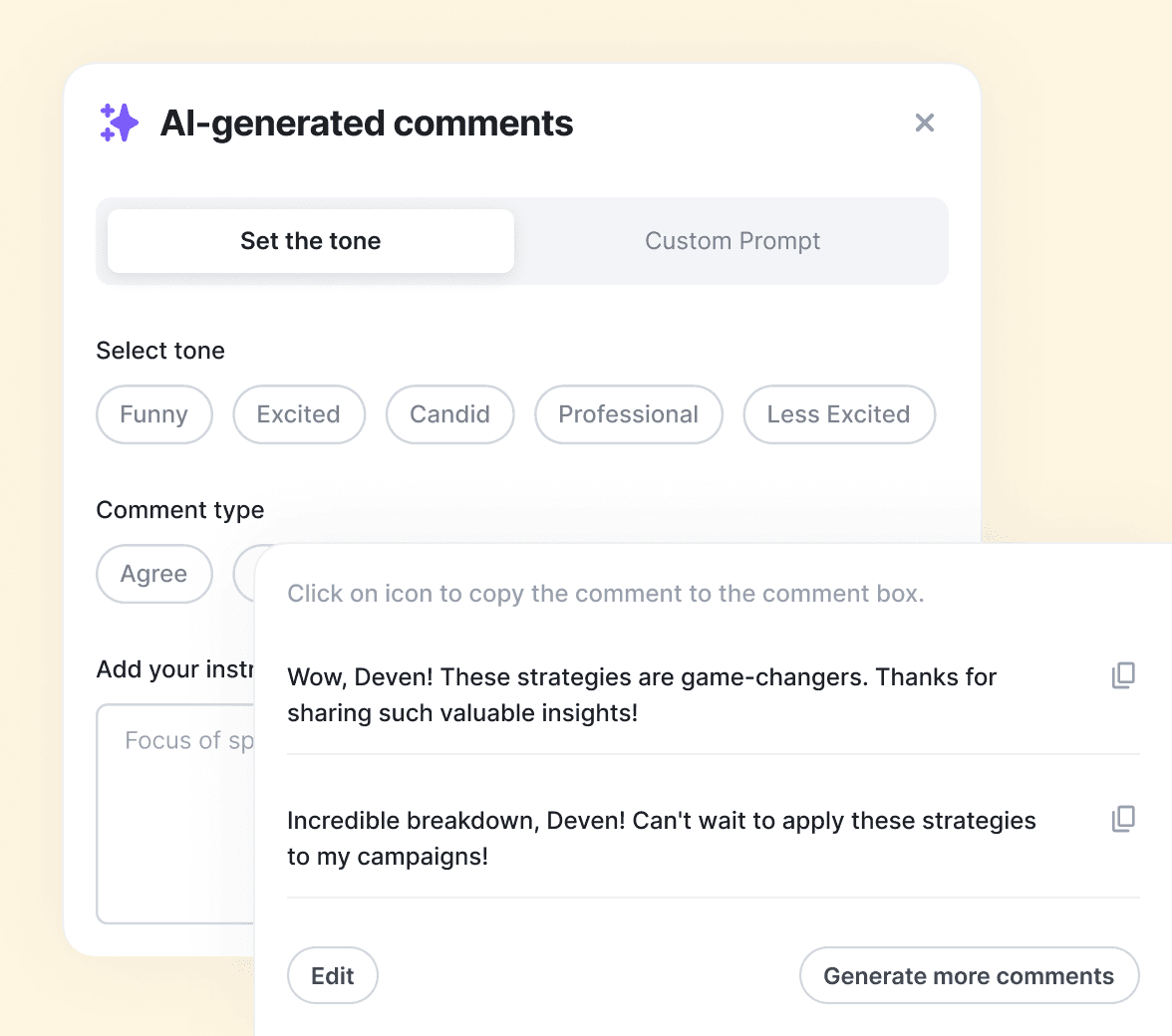
Content DNA can suggest comment drafts using the person’s tone, vocabulary, topics, and point of view. The suggestion is a starting point, and the employee can change it or write from scratch.

  • Choose a tone or add a custom prompt
  • Review and edit every suggestion before it is sent
  • Nothing is posted without the employee’s click
Supergrow AI-generated comments panel with tone selection and suggested replies

What teams using Supergrow are saying

Hear from teams building consistent LinkedIn® habits while keeping every employee’s voice and actions their own.

"Supergrow has completely changed the way we work. The credential-free onboarding, dedicated workspaces, and automation have saved us countless hours."
Justin ObermanJustin ObermanFounder, Genius Scout
"I've tried everything, Notion, and other scheduler tools, but Supergrow made my life so much easier. It's intuitive, efficient, and helps me deliver better results for my clients."
Sarra RichmondSarra RichmondGhostwriter
"Supergrow has transformed the way we manage LinkedIn® for our clients. It's efficient, reliable, and makes scaling our operations effortless."
Moshe PesachMoshe PesachFounder, StepUp Media Group
"If you're already using Make or Zapier, the Supergrow API fits right in. It's reliable, clean, and gives our team the time back to focus on client success."
Kareem MostafaKareem MostafaFounder, Bonafide
"Supergrow has increased my productivity by at least 50%. The scheduling and AI tools make content creation feel effortless."
Sarra RichmondSarra RichmondGhostwriter
"Supergrow has completely changed the way we work. The credential-free onboarding, dedicated workspaces, and automation have saved us countless hours."
Justin ObermanJustin ObermanFounder, Genius Scout
"I've tried everything, Notion, and other scheduler tools, but Supergrow made my life so much easier. It's intuitive, efficient, and helps me deliver better results for my clients."
Sarra RichmondSarra RichmondGhostwriter
"Supergrow has transformed the way we manage LinkedIn® for our clients. It's efficient, reliable, and makes scaling our operations effortless."
Moshe PesachMoshe PesachFounder, StepUp Media Group
"If you're already using Make or Zapier, the Supergrow API fits right in. It's reliable, clean, and gives our team the time back to focus on client success."
Kareem MostafaKareem MostafaFounder, Bonafide
"Supergrow has increased my productivity by at least 50%. The scheduling and AI tools make content creation feel effortless."
Sarra RichmondSarra RichmondGhostwriter

Frequently asked questions

Engage is Supergrow’s focused LinkedIn® engagement workspace. Each employee can build lists of the people and pages that matter, see their recent posts, and respond from one place with optional AI assistance.

Focus Mode presents one target post at a time with controls to comment, like, skip, and move through the list. It helps employees complete a short engagement routine without getting pulled into the main LinkedIn® feed.

Comment drafts can use the employee’s Content DNA, including their tone, vocabulary, topics, and point of view. Every suggestion remains editable, and the employee decides whether to use it.

Only the profiles and company pages added to that employee’s lists. They can be added by URL, uploaded by CSV, or selected from the people who commented on a relevant LinkedIn® post.

Yes. A user with the required LinkedIn® page access can choose an authorized company-page identity inside Engage.

Content DNA gives the draft the employee’s context, but the draft is never the final word. The employee can edit it, replace it, or write the comment themselves before choosing to send it.

No. Focus Mode places the target post and comment box side by side inside Supergrow. Employees can review the post, decide how to respond, and move to the next item without opening the main feed.

Engage uses each person’s authorized LinkedIn® connection and the official API. It does not run engagement pods, auto-like posts, or send comments in the background. Every action requires the employee’s click.

Engage is available from the Pro plan onward. Teams and Enterprise add the organization workflows needed to support multiple employee workspaces.

LinkedIn® engagement for teams

Make thoughtful engagement
easier to repeat.

Give each employee a focused list, comment support in their own voice, and full control over every like and reply.

Try for 7 days | Cancel anytime