
Manage your team's LinkedIn® presence from one dashboard
Invite members, organise by workspace, and keep a shared content calendar, without losing visibility or control. Most teams are fully set up in under an hour.
Start Free TrialRated 4.8/5 on G2
7-day free trial · Cancel anytime
Trusted by leading B2B companies






LinkedIn Team Management
What is LinkedIn team management?
The operational layer between your employee advocacy strategy and daily execution. Without it, marketing managers coordinate approvals over Slack, track content in spreadsheets, and chase executives who haven't posted in two weeks.
With it, you manage your entire team's LinkedIn presence from one dashboard: invite members in seconds, organise them into separate workspaces by team or campaign, enforce brand guidelines automatically, and review every post before it goes live. Supergrow's team management is built into the same platform where your team creates content, so there is no context-switching, no lost visibility, and no manual chasing.
One dashboard, full visibility
Every member, workspace, and scheduled post visible to admins in real time. No spreadsheets.
Live in under an hour
Team members self-onboard via invite link. No IT tickets, no onboarding calls required.
Brand stays on-message
Per-workspace brand context means every AI-generated post follows your tone and messaging guidelines automatically.
Member Management
Everyone in the right seat, with the right access.
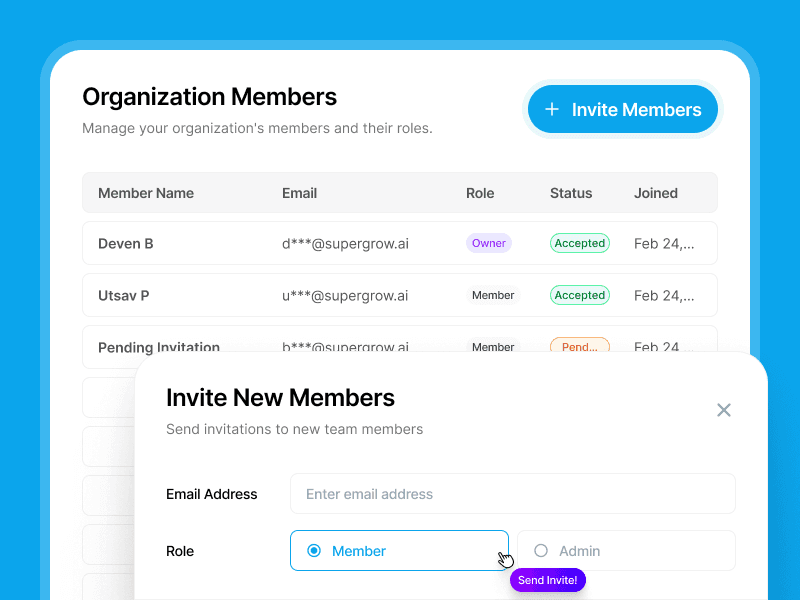
Add executives, marketers, and subject-matter experts in seconds. Assign roles, set permissions, and see who is active, all from one view.
- Invite by email, onboard in minutesMembers get an invite link and set themselves up. No back-and-forth required.
- Role-based permissionsAssign Author, Reviewer, or Admin. Each role sees only what they need to.
- Activity at a glanceSee each member's posting status, last active date, and output. No need to ask.
Workspaces
Separate teams. Shared platform.
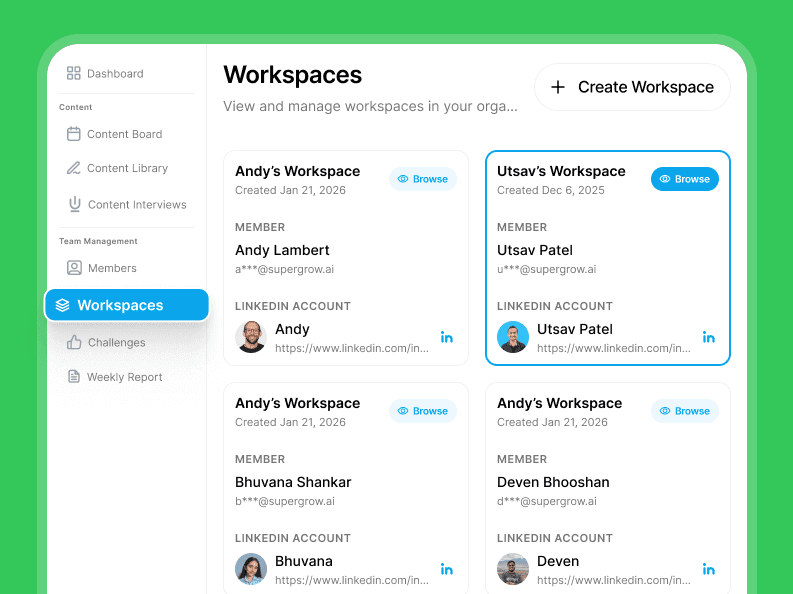
Group members into focused workspaces by team, function, or campaign. Each workspace runs independently with its own members, tone, and content view. Admins see across all of them.
- Group by team, function, or campaignCreate workspaces for execs, sales, marketing, any grouping that fits your org.
- Per-workspace brand contextSet messaging guidelines once, applied to every post generated inside that workspace.
- Cross-workspace admin viewAdmins see everything across all workspaces. Members only see their own.
Content Calendar
See what's going out, before it does.
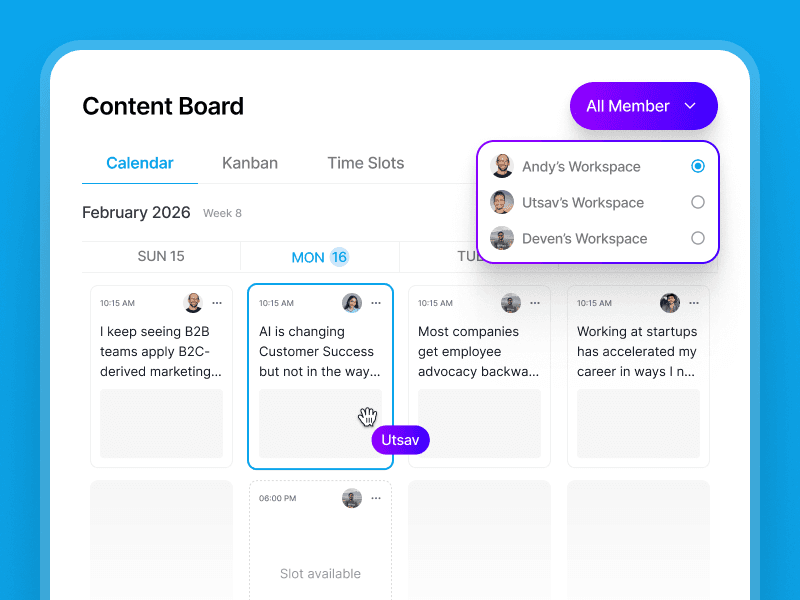
See every scheduled post across all team members and workspaces in one shared calendar. Spot gaps, avoid clashes, and plan campaigns without a spreadsheet or Slack thread.
- Unified view across all membersEvery member's scheduled and draft posts in one calendar, colour-coded by workspace.
- Drag-and-drop reschedulingMove posts to a better slot without reopening the editor or re-doing anything.
- Review and approve from the calendarClick any post to review, approve, or request edits. No screen switching required.
LinkedIn Team Management
Up and running in under an hour.
No long onboarding. No IT tickets. Invite your team, set brand context, and start managing from day one.
Create workspaces
Set up workspaces for each team, function, or campaign, and add your brand guidelines once.
Invite your team
Send invite links to executives, marketers, and SMEs. They set themselves up, no onboarding calls needed.
Set brand context
Define tone, messaging guidelines, and key topics per workspace. AI-generated posts follow them automatically.
Manage from the calendar
Review, approve, and track every post across your whole team, from one shared calendar view.
What our customers say about us
12 executives posting weekly
We'd been trying to launch an employee advocacy program for two years. Everyone agreed it mattered, but no one had time. Supergrow got 12 of our leaders posting consistently within the first month.
 GrishchaGrowth at Join
First-draft satisfactions
Our CTO was skeptical—he'd rejected every ghostwritten draft we'd ever sent. After his first Supergrow interview, he approved the posts without a single edit. He said it actually sounded like him.
 Eddie GuevarraHead of Marketing at Consalia
100% visibility
Managing 8 team members' LinkedIn® accounts used to mean constant Slack messages and last-minute surprises. Now I see every draft, every approval, every scheduled post in one place. The chaos is gone.
 Tripti ChaddaManager at Frederic Fernandez & Associates
40+ team members active
Getting our sales and customer success teams to post on LinkedIn® felt impossible. Once we launched challenges with leaderboards, everything changed. Now over 40 team members are posting regularly and actually competing for streaks.
 Harriet BuntingAssociate PR and Communications Executive at Sage
Frequently asked questions
Go to your workspace settings and send invite links directly to your team members. Executives, marketers, and subject-matter experts receive a link, create their Supergrow account, connect their LinkedIn profile, and appear in your dashboard — usually within five minutes of receiving the invite. There are no IT tickets to raise, no onboarding calls to schedule, and no complex setup on their end beyond accepting the invite and connecting their LinkedIn profile. Once they are in, Supergrow imports each person's existing LinkedIn posts to build their individual Content DNA — the AI model that learns their writing style, vocabulary, and posting patterns. That means the first time they open the editor, the AI is already writing in their voice, not in generic marketing language. Most teams have their first posts scheduled on the same day they are added.
Yes. Supergrow's team analytics dashboard shows post performance, follower growth, and engagement per member, all in one view. You can see who's posting consistently, which members are driving the most reach, and where the gaps are. No more chasing people for screenshots of their LinkedIn stats.
Supergrow supports three roles: Admin, Manager, and Member. Admins have full visibility and control across every workspace in the account, including member management, brand context configuration, and the ability to review content from all teams. Managers can review, approve, request edits, or reject posts within their assigned workspace before anything goes live. Members create and submit content for approval, and can only publish once a manager has signed off. Role assignments can be updated at any time from workspace settings — there is no limit on the number of each role type you can assign. A typical setup has one or two Admins at the programme level, a Manager per team or region, and all participating employees as Members. This three-tier structure gives you the content governance to run employee advocacy at scale without giving everyone access to everything.
Yes. The approval workflow lets managers review every post before it's published. Team members submit their content, you see it in the shared calendar with a pending status, and you can approve, request edits, or reject with comments. Nothing goes live until it's approved, giving you full control without micromanaging.
The shared calendar shows every scheduled post across all team members and workspaces in one view. You can filter by member, workspace, or status. Spot gaps in the team's posting schedule, identify content clashes before they happen, and plan campaigns across multiple voices, without spreadsheets or Slack threads.
Yes. Every team member connects their own LinkedIn account to Supergrow. Posts go live under their name, in their voice, not from a company page. Your executives, salespeople, and subject-matter experts build their personal brand while you maintain visibility and control from the admin dashboard.
Most teams are fully operational in under an hour. The typical flow: create your workspaces (5 minutes), add brand context per workspace covering tone, messaging guidelines, and key topics (10 minutes), then send invite links to each team member. Executives, marketers, and subject-matter experts receive a link, create their account, connect their LinkedIn profile, and appear in your dashboard within minutes of accepting the invite. No onboarding calls, no IT configuration, no training sessions required. Once they are in, Supergrow imports each person's existing LinkedIn posts to build their individual Content DNA — so the AI is already writing in their voice before they open their first draft. Most teams have their first posts scheduled on the same day they sign up, with no external tools, spreadsheets, or setup calls needed. The entire programme is ready to run from day one.
LinkedIn's native tools give you basic Company Page analytics and a content scheduler with no AI assistance. There is no approval workflow, no per-member performance tracking, and no way to manage multiple voices from a central dashboard. Supergrow adds AI content creation trained on each person's individual voice, a manager-controlled approval workflow before anything goes live, a shared calendar showing every scheduled post across all team members, workspace-level brand context that shapes every AI-generated draft, and individual member analytics tracking follower growth and engagement. In practice, this means your executives post more consistently because content creation is faster, your brand stays protected because nothing goes live without approval, and your reporting moves from manual LinkedIn screenshots to a live dashboard you can share with leadership. Where LinkedIn covers company page publishing, Supergrow gives you the infrastructure to run a high-quality employee advocacy programme at scale.
Get your team organised. Start today.
Invite your first members, set up workspaces, and see everything in one calendar. In under an hour.
7-day free trial · Cancel anytime