Supergrow

LinkedIn Engagement

Get seen by the people you actually want to reach

Add them to a list, then comment on their latest posts in your voice, in one focused pass. Ten minutes a day, without disappearing into the LinkedIn feed.

Start free trial

7-day free trial · Cancel anytime

Loved by 1000+ LinkedIn creators

How it works

A daily engagement habit, in three steps.

Search for a profile
+
+
linkedin.com/in/…

1. Build your lists

Add the people who matter by name or profile URL, or paste a LinkedIn post link and pull in everyone who commented. Keep as many lists as you need.

Refresh postsUpdated 2h ago

2. Open your daily feed

The latest post from every profile on your list lands in one clean stream, refreshed every morning. No timeline, no noise.

Write your comment, or generate one with AI…
Like the post tooLikeSkipComment

⌘/Ctrl+Enter comment · S skip · L like · Esc exit

3. React and comment on the spot

Work the list in Focus Mode. Write or generate your comment, tick like the post too, and move on. S skips, L likes, Cmd+Enter comments.

No pods, no bots

Nothing leaves your account without you.

Every like and every comment starts with your click and goes out through the official LinkedIn API, on the connection you authorized. Supergrow never posts on your behalf.

Supergrow is a LinkedIn verified partner.

Official LinkedIn API

Connect once with OAuth, the way LinkedIn asks its partners to. There is no password to hand over and no browser extension to install.

One click, one action

No pods, no auto-likes, and no comments going out while you sleep. Nothing is sent until you press the button.

Everything in one place

Everything you need to show up in the comments

Lists you can build in seconds, comment drafts in your voice, and a keyboard-driven Focus Mode. Ten minutes a day turns into visibility, trust, and conversations that lead somewhere.

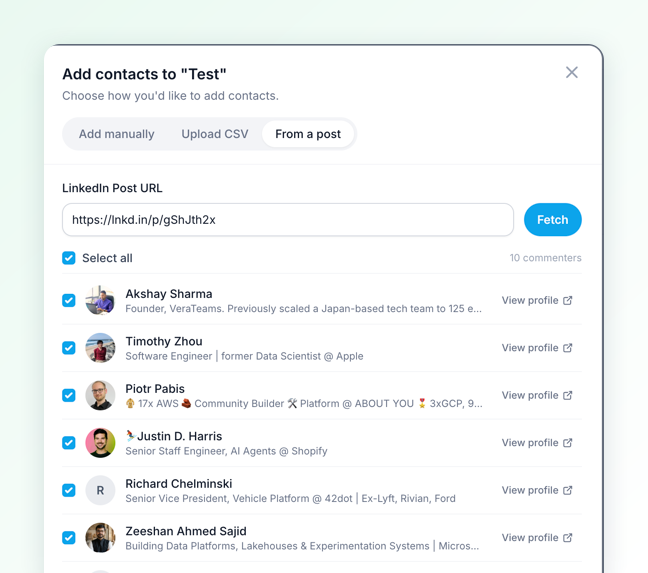
Build a list from any post

Add the people who matter: dream clients, peers, and industry voices. Or paste any LinkedIn post link, even a short lnkd.in one, and get everyone who commented back with their name, headline, and photo.

  • Tick the people worth talking to and add them in one go
  • Open a profile first if you want to check
  • Or add people by hand, or upload a CSV
  • Keep as many lists as you need
Supergrow add-contacts dialog with the From a post tab open, listing commenters with their headlines and a checkbox each

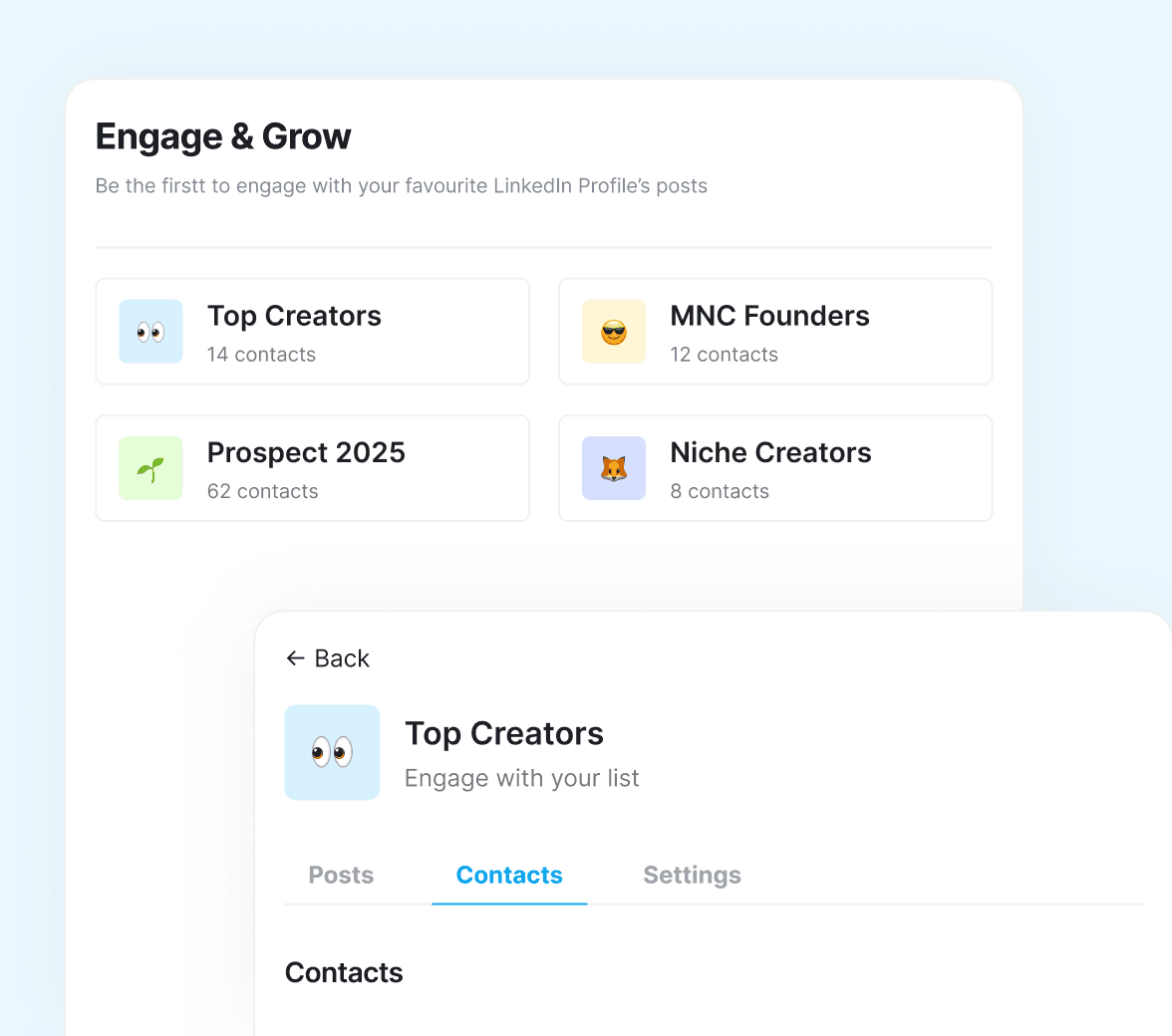
Open your list, not the feed

Every profile on your list shows up with its latest post, in one clean stream refreshed daily. No timeline, no ads, no algorithm deciding what you see.

  • The latest post from each profile you follow
  • Refreshed every morning, so there is always something to reply to
  • Nothing else competing for your attention
Supergrow Engage & Grow panel with Top Creators, MNC Founders, Prospect 2025, and Niche Creators lists

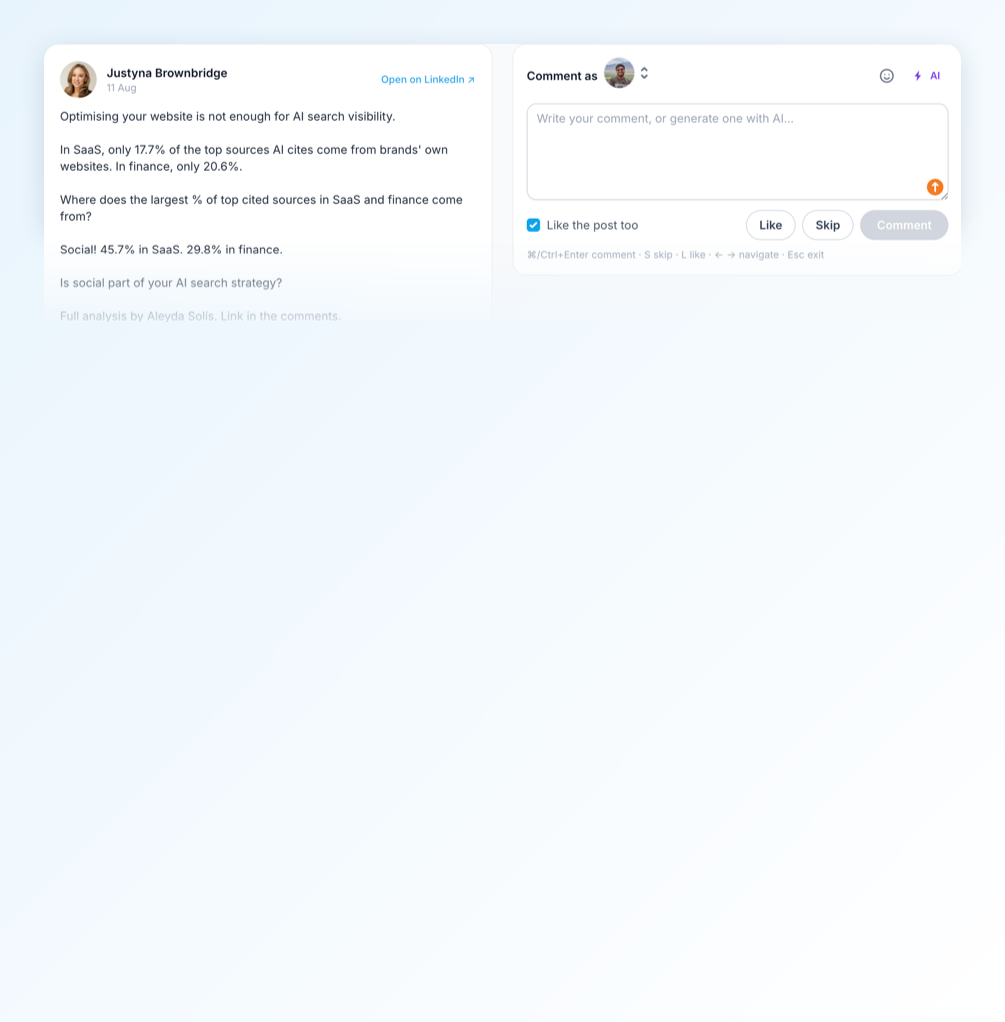
Focus Mode, built for the keyboard

Work your list one post at a time. The post sits on the left and your comment box on the right, with a counter so you know how far through you are.

  • Write the comment yourself or generate one in your voice
  • Tick like the post too, and move on
  • S skips, L likes, Cmd+Enter comments, arrows move you through the list
  • Comment as yourself or as a company page
Supergrow Focus Mode with a LinkedIn post on the left and a comment box on the right, a like the post too checkbox, and the keyboard shortcuts for skip, like, and comment

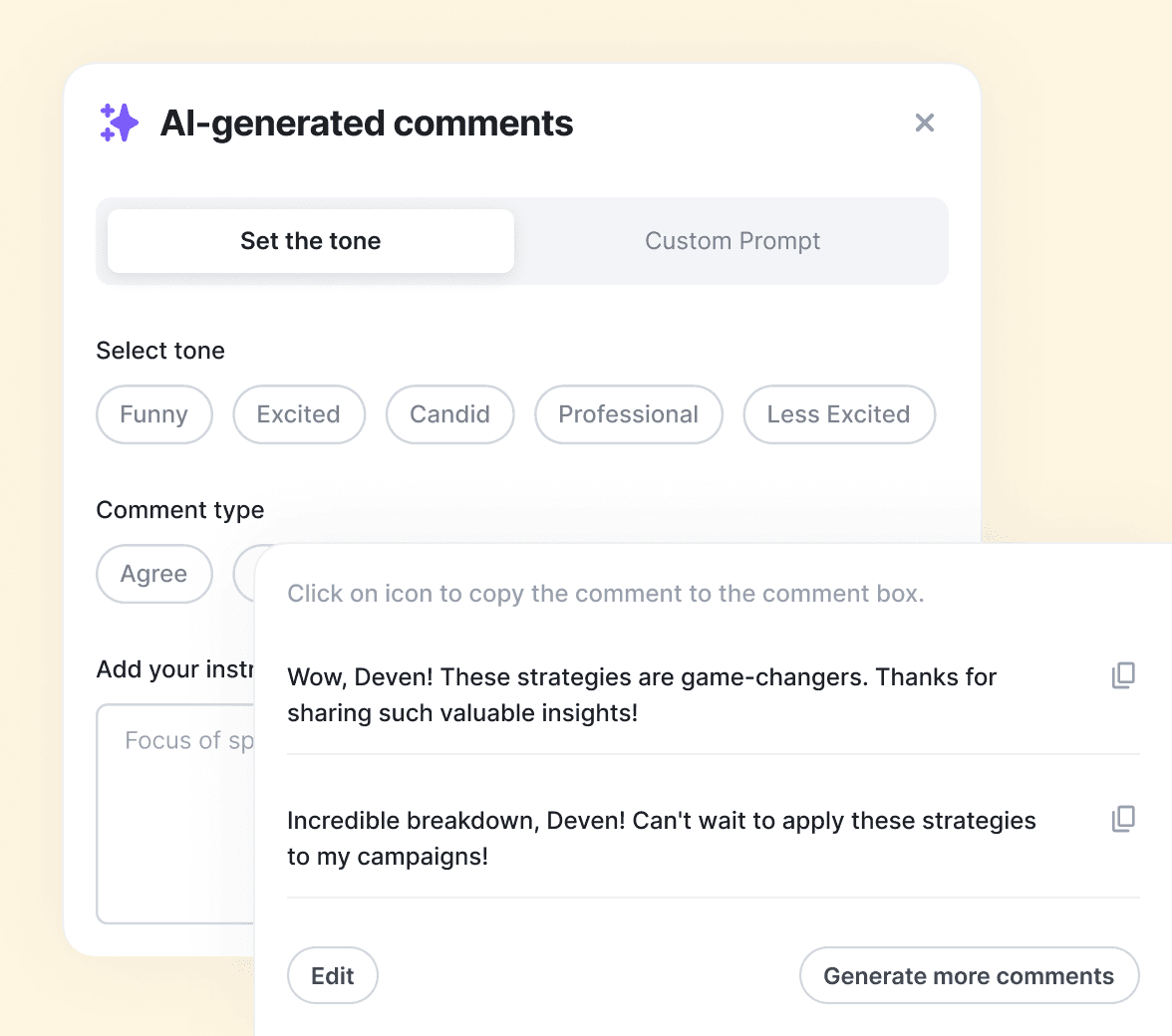
AI comments in your voice

Draft options matched to your Content DNA, so every reply sounds like you wrote it. Because you did, just faster.

  • Set the tone, or write a custom prompt
  • Edit anything before it goes live
  • Nothing is posted without your click
Supergrow AI-generated comments panel with tone selection and suggested replies

They grow with Supergrow

Hear from professionals who stopped struggling with LinkedIn® content.

"Supergrow has completely changed the way we work. The credential-free onboarding, dedicated workspaces, and automation have saved us countless hours."
Justin ObermanJustin ObermanFounder, Genius Scout
"I've tried everything, Notion, and other scheduler tools, but Supergrow made my life so much easier. It's intuitive, efficient, and helps me deliver better results for my clients."
Sarra RichmondSarra RichmondGhostwriter
"Supergrow has transformed the way we manage LinkedIn® for our clients. It's efficient, reliable, and makes scaling our operations effortless."
Moshe PesachMoshe PesachFounder, StepUp Media Group
"If you're already using Make or Zapier, the Supergrow API fits right in. It's reliable, clean, and gives our team the time back to focus on client success."
Kareem MostafaKareem MostafaFounder, Bonafide
"Supergrow has increased my productivity by at least 50%. The scheduling and AI tools make content creation feel effortless."
Sarra RichmondSarra RichmondGhostwriter
"Supergrow has completely changed the way we work. The credential-free onboarding, dedicated workspaces, and automation have saved us countless hours."
Justin ObermanJustin ObermanFounder, Genius Scout
"I've tried everything, Notion, and other scheduler tools, but Supergrow made my life so much easier. It's intuitive, efficient, and helps me deliver better results for my clients."
Sarra RichmondSarra RichmondGhostwriter
"Supergrow has transformed the way we manage LinkedIn® for our clients. It's efficient, reliable, and makes scaling our operations effortless."
Moshe PesachMoshe PesachFounder, StepUp Media Group
"If you're already using Make or Zapier, the Supergrow API fits right in. It's reliable, clean, and gives our team the time back to focus on client success."
Kareem MostafaKareem MostafaFounder, Bonafide
"Supergrow has increased my productivity by at least 50%. The scheduling and AI tools make content creation feel effortless."
Sarra RichmondSarra RichmondGhostwriter

Frequently asked questions

Engage is a distraction-free workspace for LinkedIn commenting. Build lists of the people you want to reach, then work through their latest posts in Focus Mode, commenting in your voice without hunting through a noisy timeline.

Focus Mode walks you through your list one post at a time, with the post on the left and the comment box on the right. Write or generate a comment, tick like the post too, and move on. It is built for the keyboard: S skips, L likes, Cmd+Enter comments, the arrow keys move you through the list, and Esc exits.

Comment drafts are generated from your Content DNA, your tone, vocabulary, and point of view, so suggestions read like you, not a template.

Only people you add. Add them by hand, or paste a LinkedIn post link and pull in everyone who commented, with their name, headline, and photo, then tick the ones worth talking to.

Yes. Engage works with company page accounts too, and you choose which account you are commenting as.

No. Every draft is tailored to your voice, and you can edit anything before it goes live. You're always the final filter.

No. Focus Mode puts the post and your comment box side by side inside Supergrow, so you can like, comment, and move to the next one without getting pulled into the LinkedIn timeline.

Yes. Nothing is automated or mass-posted. You review, edit, and approve every comment yourself, and liking a post is a checkbox you tick per post. Engage just removes the searching and drafting, not your judgment.

Founders, creators, and teams who know commenting grows their presence but can't spend an hour a day in the feed. If you want visibility with the right people, not just more scrolling, it's built for you.

Yes. Engage is available from the pro plan onwards.

Stop scrolling. Start engaging.

Open your curated feed, leave your first comment in your voice, and start building the relationships that grow your presence.

Start free trial

7-day free trial · Cancel anytime