
A buyer sees one of your posts, clicks your name, and scans your profile before replying to an email. In less than a minute, they decide whether you understand their problem.
That is LinkedIn personal branding in practice.
You don’t need to become LinkedIn famous. You need a profile that explains what you do, a clear point of view, and posts that show you understand the work.
Of course, fitting all of this around a full-time job is where things get difficult. Posting slips during busy weeks. AI-assisted drafts start sounding generic. Follower counts grow without telling you whether potential buyers are paying attention.
This guide will help you build a LinkedIn presence that supports your career and your company’s pipeline. You’ll learn how to position yourself, improve your profile, choose useful topics, publish consistently, and measure the conversations your content creates.
What LinkedIn Personal Branding Means for a B2B Expert
Your LinkedIn personal brand is the impression people form from your profile, posts, and conversations.
For a B2B expert, it should answer three questions:
- What do you know?
- Who do you help?
- What do you believe about the work?
The goal is credibility, not attention for its own sake.
A buyer comparing vendors doesn’t need you to be the most popular person in your industry. They need to see that you understand their problem, have relevant experience, and can explain your approach clearly.
Visibility may get someone to your profile. Credibility gives them a reason to stay, remember you, and start a conversation.
Why Buyers Check People Before Talking to Vendors
Most potential buyers aren’t evaluating products today. LinkedIn’s B2B Institute found that 95% of potential B2B buyers aren’t ready to buy right now.
They may enter the market later. When that happens, they’re more likely to remember the companies and experts they have already encountered.
That is one job your personal brand can do. It keeps you familiar while buyers are learning about a problem, long before they start requesting demos or comparing proposals.
Credible expert content also influences buying decisions. In LinkedIn’s 2025 research on B2B creators, 87% of buyers said they preferred credible content from industry experts. Another 82% of marketing decision-makers said B2B creator content influenced them.
This doesn’t only apply to full-time creators. When employees share useful ideas from their work, buyers get a clearer view of the knowledge inside the company.
A potential customer may visit your website first. They may then check the salesperson who contacted them, the founder behind the product, or the expert who could lead their project. Each profile helps them answer a simple question.
Do these people understand what we need?
A focused LinkedIn presence makes that answer easier. The benefits of personal branding also extend beyond buyer confidence. A credible presence can support your company’s pipeline while creating new opportunities for your career.
Set Your Positioning Around the Problem You Solve
Before rewriting your profile or drafting a post, decide what you want people to remember you for.
Start with three elements:
- Your niche: The area where your experience, interests, and customer problems overlap
- Your audience: The decision-makers, practitioners, peers, or partners you want to reach
- Your outcome: The result someone can expect from working with you or your team
Then look at your existing profile as if you were seeing it for the first time.
Does your headline explain what you do and who you help? Does your About section tell a useful story or list previous jobs? Do your recent posts reflect the expertise you want to be known for?
Turn your answers into one clear positioning statement.
For example, a salesperson at a sales software company might say:
I help B2B sales teams win more deals from cold outreach.
This sentence becomes a useful filter. A topic, comment, or connection should make sense in relation to the expertise you’re trying to build.
If you’re posting as an employee, discuss your main topics with your manager or marketing lead. Your content should support the problems your company solves without turning your profile into a second company page.
Build a Profile Buyers Can Understand in 30 Seconds
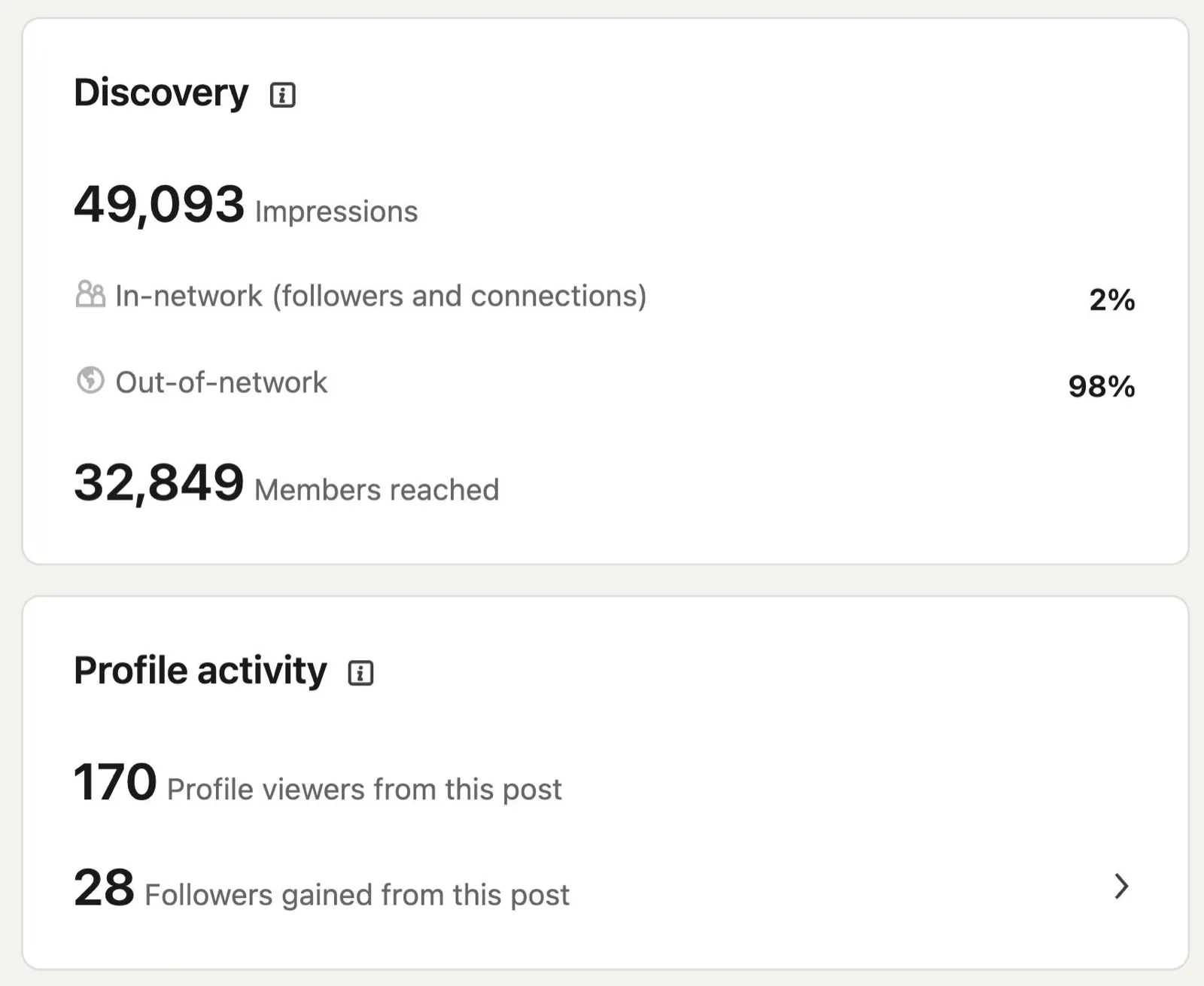
A useful post often sends people to your profile. LinkedIn records these visits in post analytics under “Profile viewers from this post.”
What happens next depends on how quickly your profile makes sense.
Start with your headline. It should tell people what you do, who you help, and where your expertise sits.
“SaaS content strategist for B2B healthcare brands” says more than “Content Manager.” It gives the reader a category, an audience, and a reason to keep reading.
If you need a starting point, Supergrow’s free LinkedIn headline generator can help you explore a few options.
Your About section should then expand on the headline. A simple structure works well:
-
Describe the problem your audience faces.
-
Explain how you approach it.
-
Support your claims with experience, results, or examples.
-
Tell the reader why they should contact you.
The rest of your profile should provide proof. Add recommendations that mention specific outcomes. Feature your best work, case studies, or project results. Use a clear photo and a banner that supports your professional focus.
You don’t need to include everything you have ever done. Optimizing your LinkedIn profile means choosing the details that help potential buyers answer one question: “Can this person help us?”
Pick a Point of View and a Few Topics
A polished profile tells people what you do. Your point of view tells them how you think.
This doesn’t mean forcing a controversial opinion into every post. Your point of view comes from the patterns you notice, the problems you have solved, and the lessons you have learned through the work.
Choose three to five topics where your experience overlaps with problems your audience regularly encounters.
You can vary the type of post within those topics. Some posts can teach a process or lesson. Others can show proof through a project, result, or customer question. You can also start conversations by asking people to compare experiences.
A useful post should educate, entertain, or show empathy. The best posts often do more than one. People in different roles can build distinct personal brands without drifting away from the company’s work.
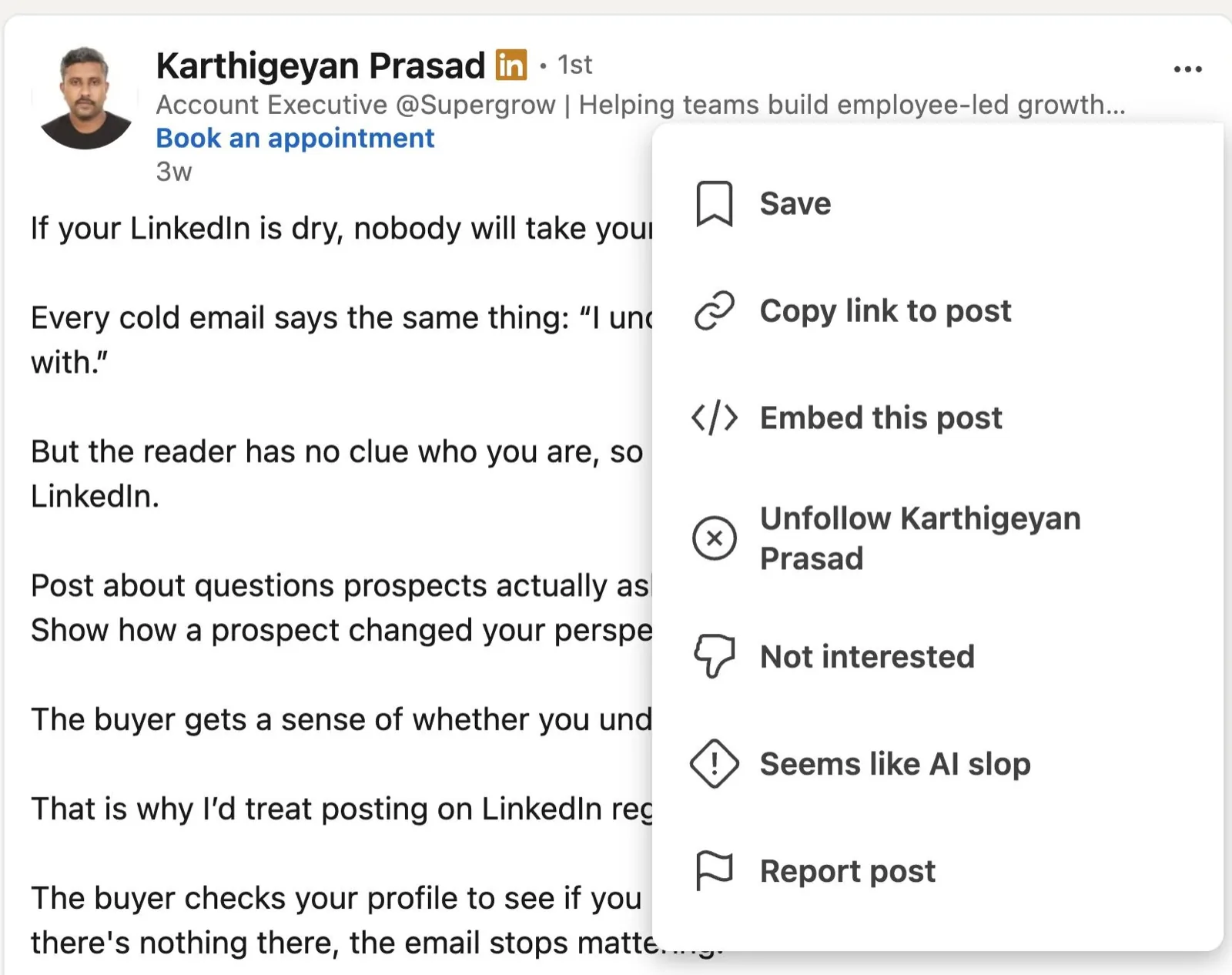
Karthigeyan Prasad writes about how a dry LinkedIn profile can weaken cold outreach.
He also starts buyer-focused discussions with questions such as “What would make you tell me not to buy?”
Shashank Bhat shares technical lessons from product engineering. In one post, he explained why an AI-generated PDF could open correctly but still fail when LinkedIn processed it.
Taher Batterywala writes about employee advocacy. His content explains how Supergrow helps team members preserve their voices while checking the facts in their posts.
Each person has a clear lane. They don’t need to comment on every company update or cover every subject in the industry. The strongest personal branding examples follow the same principle by building recognition around a focused set of ideas.
And it makes the content feel like expertise rather than promotion.
Use AI Without Sounding Like Everyone Else
AI can help you organize a rough idea, improve a sentence, or turn notes into a first draft. The problem starts when it replaces the idea itself.
LinkedIn addresses this in its best practices for content created with the help of AI, updated in October 2026. The platform says it doesn’t want “AI slop,” its term for polished but low-effort content with little original value.
LinkedIn also says generic or repetitive content may receive less distribution. Members can now choose “Seems like AI slop” when giving feedback on a post.
You can still use AI. Just make sure the finished post reflects something you know, experienced, noticed, or believe.
Start with a real source. It could be a customer question, a mistake, a project decision, a sales objection, or a result you didn’t expect.
Write the opening in your own words before asking AI to help. Remove introductions that could fit almost any business topic. Then read the draft aloud. If a sentence sounds unnatural when spoken, it probably doesn’t belong in the post.
LinkedIn recommends reviewing and approving AI-assisted content before publishing it. The platform also advises members to disclose AI use when it played a substantial role in creating the content.
Supergrow helps employees start from their own knowledge. PostCast captures ideas and stories through guided conversations, while Content DNA shapes the draft around the person’s usual language.
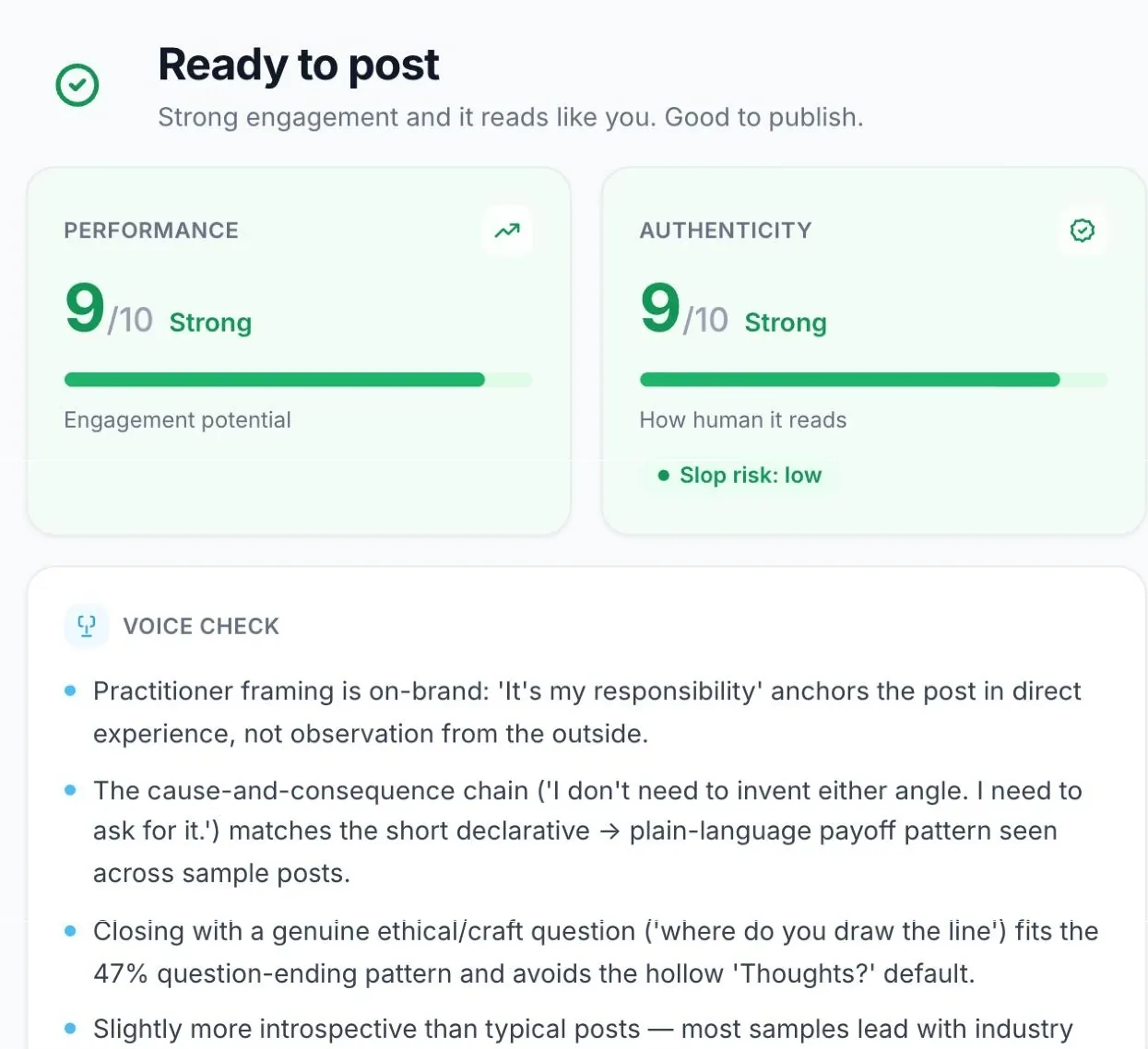
Check Score then reviews Performance and Authenticity separately. It flags lines that appear AI-written, suggests specific changes, and checks whether the post sounds consistent with the author’s voice.
AI can make writing faster. Your experience is what makes the result worth reading.
Build a Routine You Can Maintain
You don’t need to post every day. You need a rhythm that survives busy weeks.
Your audience, topics, and publishing frequency should work together as one LinkedIn content strategy. Keep the plan realistic. Two useful posts every week will do more for your reputation than daily posting you can only sustain for a month.
When Supergrow developed its internal employee advocacy program, the team found four common obstacles. Employees were short on time, uncertain about their writing, convinced every post had to be long, or unsure where to save ideas.
The program addressed those problems with a simple routine.
Employees joined a 30-minute planning session to identify topics. Newer contributors could ask for feedback, but every author kept final control of their post. Ideas and drafts stayed in one shared place instead of being scattered across notes, messages, and documents.
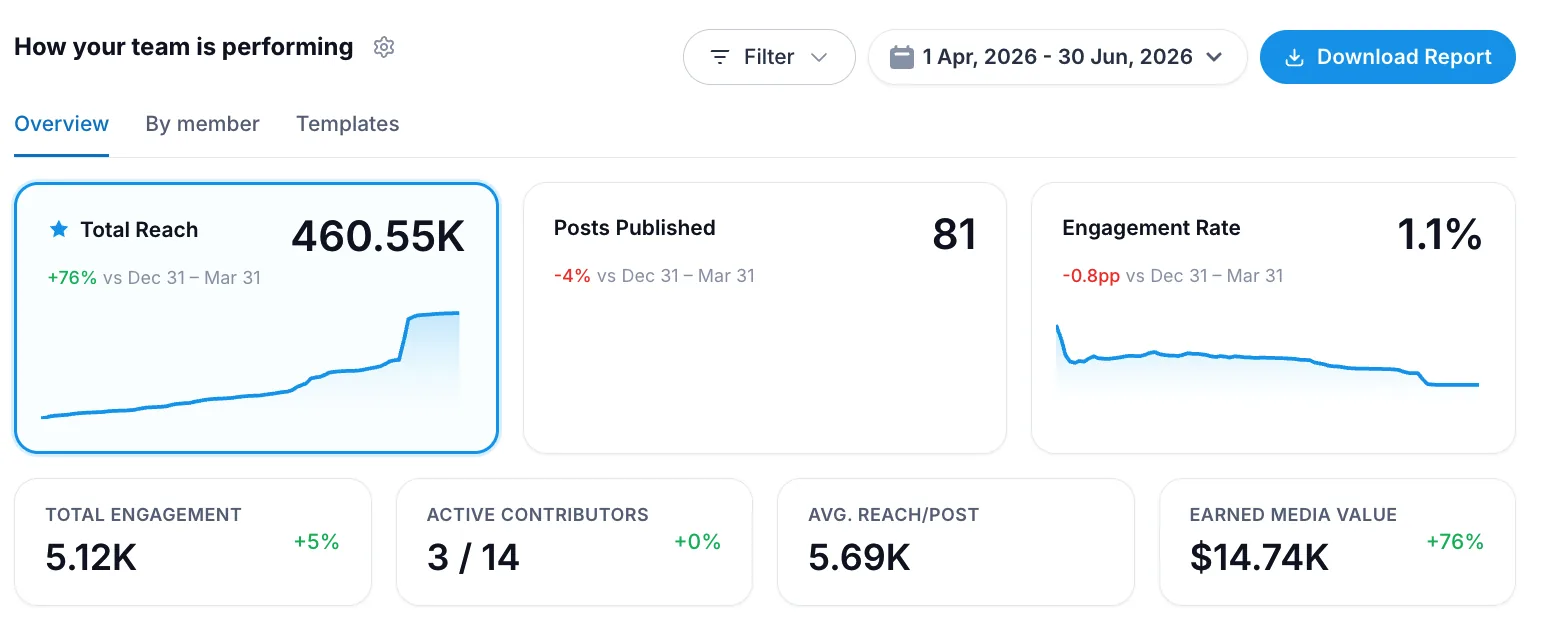
From April through June 2026, five people at Supergrow published 81 posts and generated 460,000 impressions.
You can follow the same principle without copying the exact process. Set aside time each week or month to capture ideas and prepare drafts. Maintain a mix of evergreen lessons, timely observations, and personal experiences from your work.
A simple Supergrow workflow looks like this:
-
Capture the idea. Record your thoughts with PostCast or turn an existing article, PDF, or video into a draft.
-
Find supporting inspiration. Use Inspiration and Content Inspiration to explore relevant examples. The Posts and Influencers tabs help organize sources by category.
-
Review the draft. Use Check Score to assess Performance and Authenticity, then revise any generic or AI-sounding lines.
-
Plan the post. Organize drafts in the calendar or Kanban board and use LinkedIn post scheduling to maintain your chosen cadence.
The goal isn’t to fill a calendar. It is to make useful posting easier to continue.
Join the Conversations Your Buyers Already Follow
You don’t always need to publish a post to get noticed.
A thoughtful comment can introduce your ideas to the author’s audience. It also supports social selling on LinkedIn by helping potential buyers become familiar with your expertise before receiving a pitch or connection request.
Start by following a manageable group of people. Include customers, prospects, industry peers, and voices your target buyers already pay attention to.
When you comment, add something the original post doesn’t already say. Share an example, ask a specific question, or explain where your experience differs. “Great post” may be friendly, but it doesn’t tell anyone what you know.
After a webinar, conference, or community event, continue relevant conversations on LinkedIn. Review your network every few months so your feed stays useful instead of becoming a stream of unrelated updates.
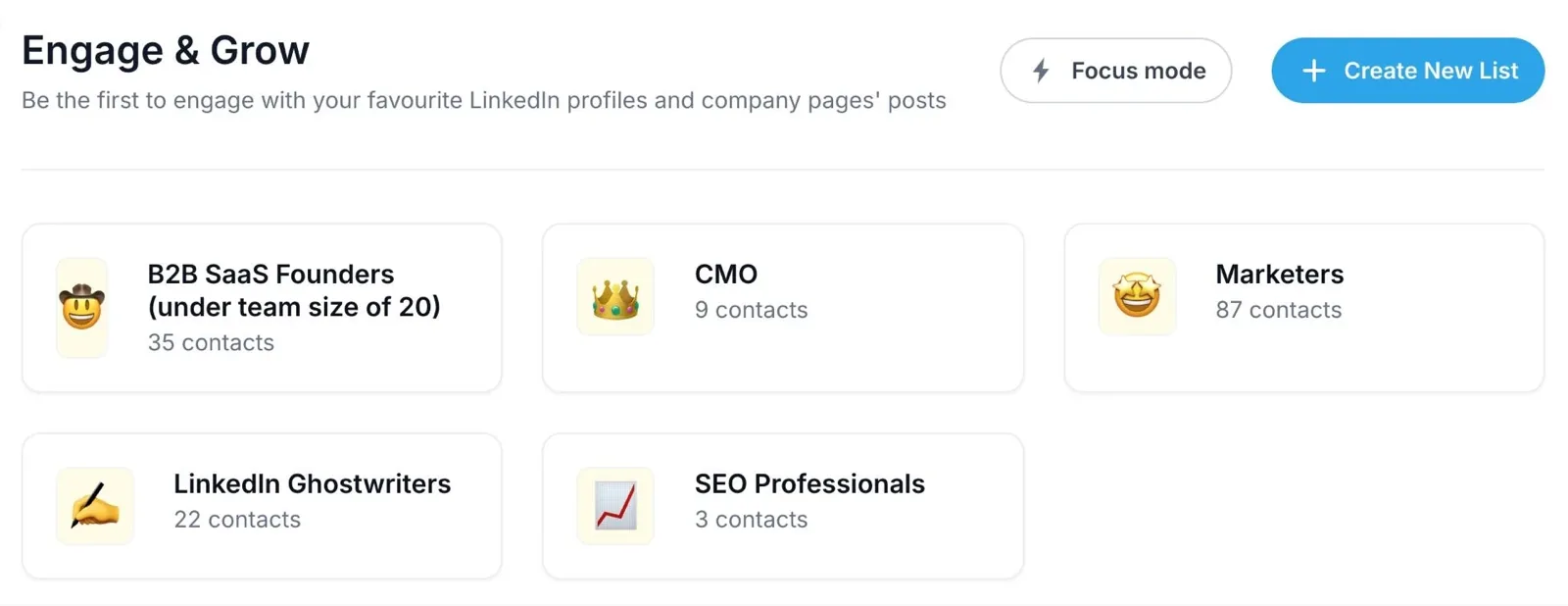
Supergrow Engage lets you organize prospects, customers, and peers into separate lists. You can then follow their posts in a more focused feed.
You still write and publish each comment yourself. Supergrow uses LinkedIn’s official API and doesn’t require a browser extension.
Measure Conversations, Not Just Followers
Watching your follower count rise can feel encouraging. It doesn’t tell you whether the right people are paying attention.
Follower growth and impressions still matter, but they only show part of the picture. The most useful LinkedIn metrics connect your content with profile visits, conversations, meetings, referrals, and other relevant opportunities.
LinkedIn’s post analytics also show how many people visited your profile or followed you after seeing a post.
Premium members can review profile viewers from the previous month and the past 90 days. People browsing in private mode may not appear, so treat this figure as a minimum rather than a complete count.
| What to track | Where to find it |
|---|---|
| Profile viewers from target accounts | Post analytics and Premium profile viewers |
| Inbound messages and meeting requests | LinkedIn inbox and calendar |
| Prospects who mention your posts | Sales call notes and CRM |
Compare each person’s results with their own previous performance. Comparing a newer employee with the team’s most established creator rarely tells you anything useful.
If someone doubles their usual reach, attracts profile visits from relevant accounts, or starts receiving better questions, that is progress.
Supergrow analytics tracks impressions, reactions, comments, reposts, follower growth, and engagement. Teams can review performance by post, person, or reporting period through LinkedIn’s official API.
Turn Your Expertise Into a LinkedIn Presence
A credible LinkedIn personal brand starts with clarity. People should understand what you know, who you help, and how you think within a few minutes of visiting your profile.
You don’t need to publish every day or comment on every industry trend. Choose a few relevant topics, share lessons from your work, and follow a schedule you can maintain.
Your day job already gives you plenty to discuss. Sales calls, project decisions, customer questions, mistakes, webinars, and internal conversations can all become useful content when you capture the lesson behind them.
Start a 7-day free trial of Supergrow to turn your expertise into consistent LinkedIn content without losing your individual voice.