
LinkedIn gave every user a button to report a post as "AI slop." More than a million people used it within two weeks. LinkedIn's Chief Product Officer, Hari Srinivasan, then confirmed what happens next: flagged content now gets 40% fewer views.
If you run an employee advocacy program, that number may explain why your team's posts reach fewer people than they did a month ago.
Think about what it means for a program built on employee voices. You spent months getting people to post. If AI made their content generic, LinkedIn is now the one deciding fewer people see it. That is the real cost of using AI for employee advocacy the wrong way.
You do not fix that by banning AI. Your team will use it regardless. You fix it by using it the way this article lays out, so LinkedIn rewards the content instead of burying it.
Why AI Slop Now Costs Your Employee Advocacy Program Reach
For a long time, "sounds like AI" was a matter of taste. You might not like a generic post, but you still saw it. That is no longer true.
LinkedIn now identifies low-quality AI-generated content and limits how far it spreads. LinkedIn is also blocking automated comments and expanding profile verification.
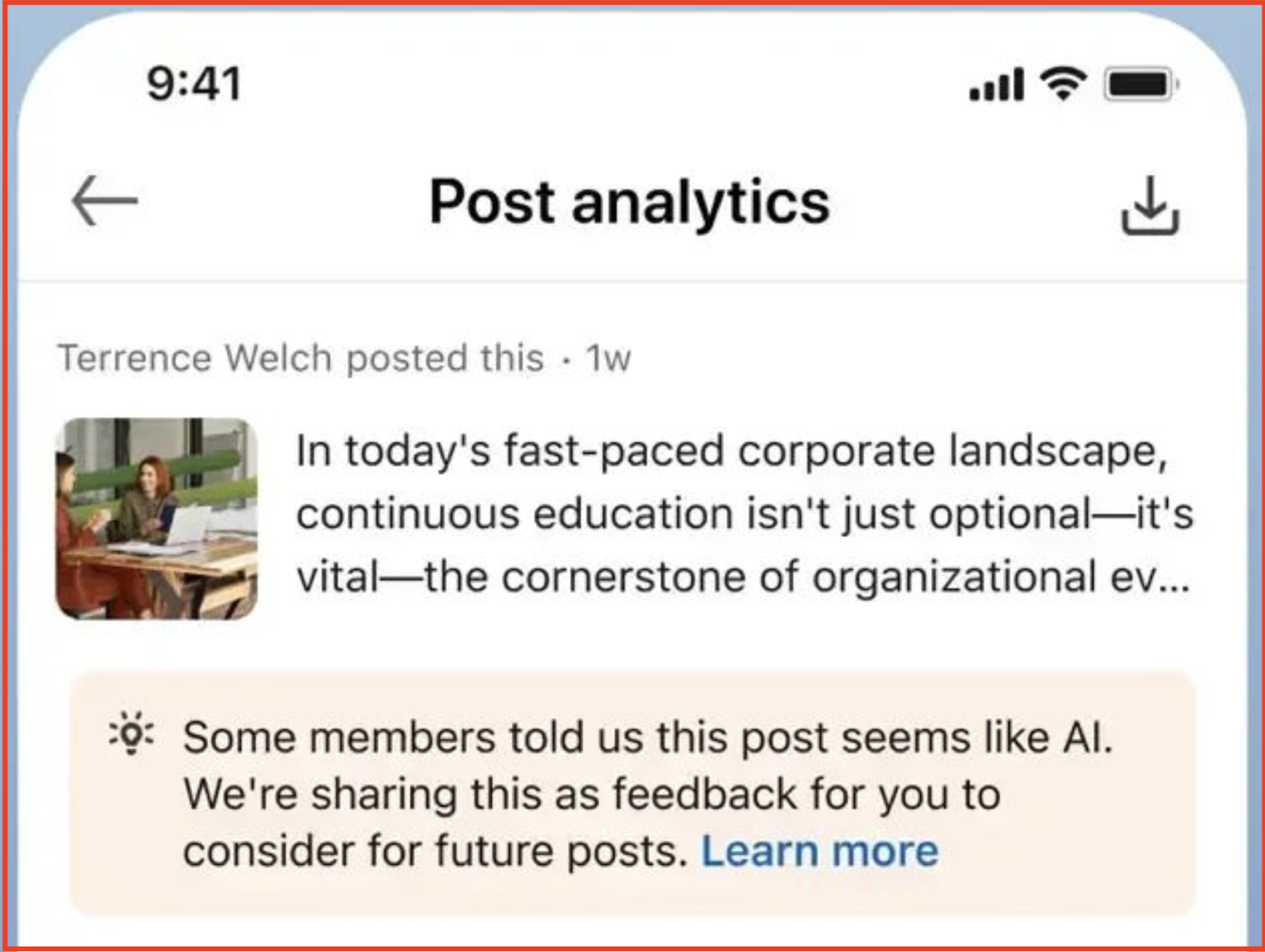
One detail matters most for anyone running an employee advocacy program. When a post gets enough reports, the author sees a private note in their own analytics saying members think it looks AI-generated. Your employees will see their content read as fake on their own LinkedIn dashboard.
The tool is not the villain here. ChatGPT, Claude, and Gemini are capable writing tools.
The problem is the workflow: someone types "write a LinkedIn post about our new feature" and pastes the result straight in. These are general-purpose models. They were never built to sound like a specific person, so what they return is competent, generic, and easy to spot.
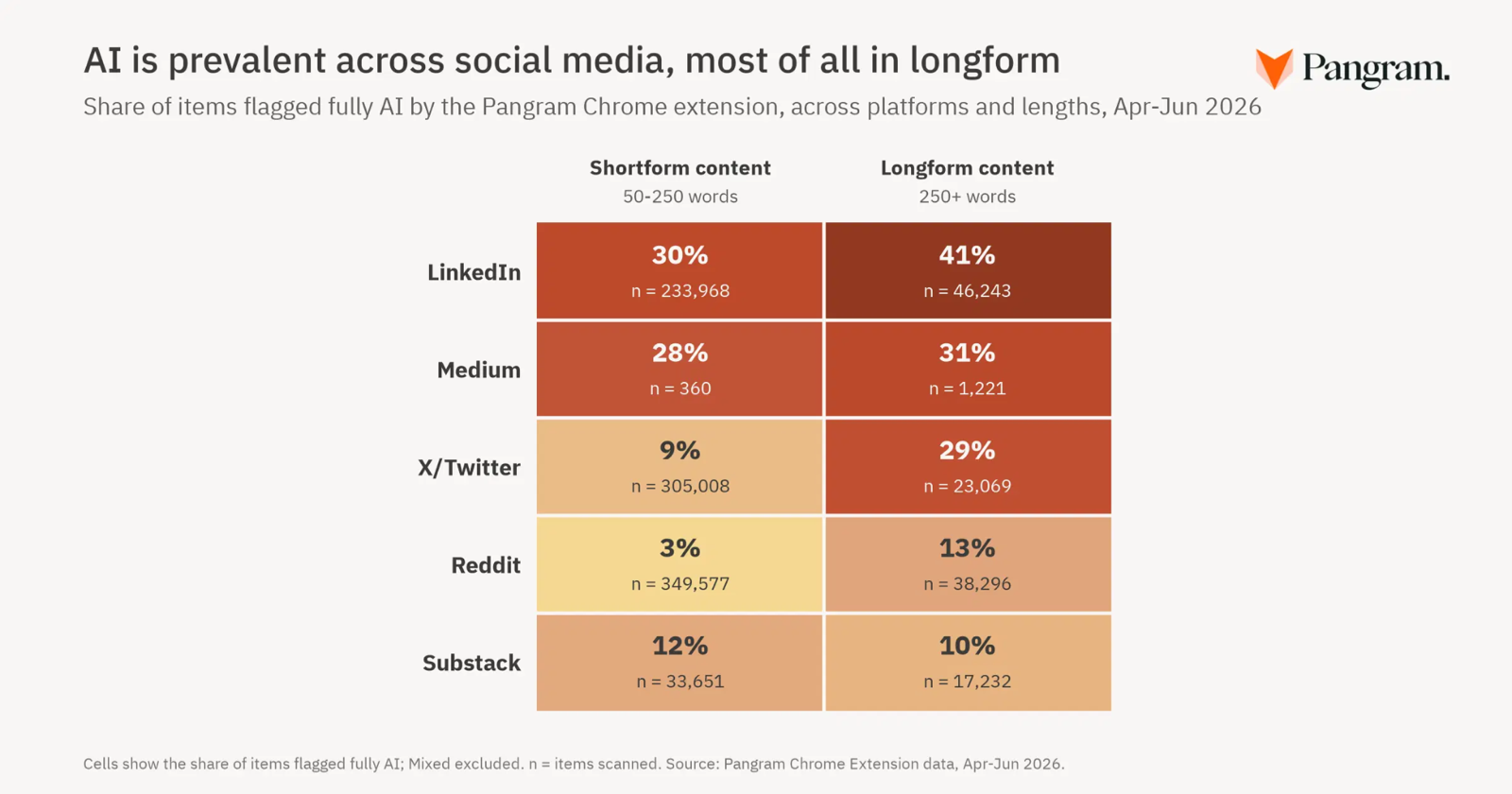
Pangram, an AI detection firm, found 42% of LinkedIn long-form posts were flagged as fully AI-generated.
That is what makes this expensive for advocacy specifically. Employees are the most trusted voice a company has. Edelman's 2026 Trust Barometer puts trust in "my employer" at 78%, far ahead of business or media.
That trust is why advocacy works. You activated real people because buyers trust them more than your brand. Slop is the fastest way to sound like the brand again.
How to Use AI for Employee Advocacy Without Sounding Like AI
None of what follows requires banning AI or writing every post by hand. It requires changing what you feed the AI and what you do with its output.
The seven rules below separate content that sounds like your team from content that LinkedIn files as slop. Each one closes a gap where advocacy programs usually let AI take over the wrong part of the job.
Rule 1: Capture the Voice Before You Touch AI
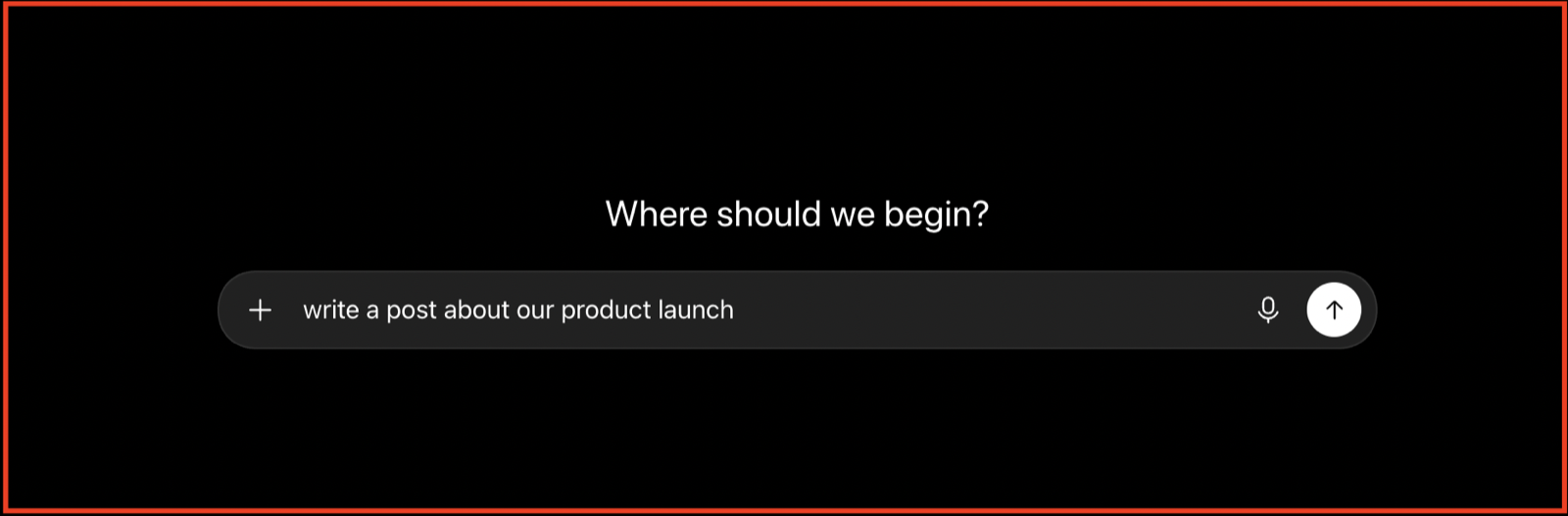
The mistake is starting with a prompt. Someone opens ChatGPT, types "write a post about our product launch," and hands the model a blank slate. With nothing real to work from, it fills the gap with the average of everything it has seen. LinkedIn's classifier now recognizes that average and buries it.
The fix is to reverse the order. Capture what the person actually thinks first, then let AI shape it.
A five-minute answer to a good question carries real opinions, examples, and the way they phrase things. That raw material is the one thing a general model cannot invent, and it is what keeps a post on the right side of the slop filter.
This is what Supergrow's PostCast is built to do. An AI host interviews the employee; they talk through what they know, and the session comes back as drafts built from their own words rather than a generic guess.
Content DNA holds their voice profile underneath, so the writing matches how they actually sound across every post, not just the first.
The order is the whole rule. Prompt first, and you get the average. Person first, and you get something only they could have said.
Rule 2: Feed It Real Material, Not Blank Prompts
Even with a voice profile in place, a model still needs something to work from. Ask it to write about a topic from nothing, and it reaches for the same stock points everyone else gets. The output is clean and empty because the request was never specific.
Your company already produces the specific material. A webinar recording, a customer call, a support thread, a long internal Slack answer, a blog post nobody turned into social. Each one holds a real example or a real opinion that a cold prompt never will.
The fix is to start the AI there, on something that already exists, instead of on a blank line.
Peter Caputa, CEO of Databox, drew the line clearly. He builds his posts from original material like call recordings, and describes the difference as "Because I am sourcing from original material, because I am writing original thoughts... I'm writing using AI as a writing tool as opposed to using AI to write for me."
Our AI LinkedIn post generator takes that literally. Drop in a YouTube link, a PDF, an article, or a voice note, and it pulls the substance out into LinkedIn posts rather than inventing filler.
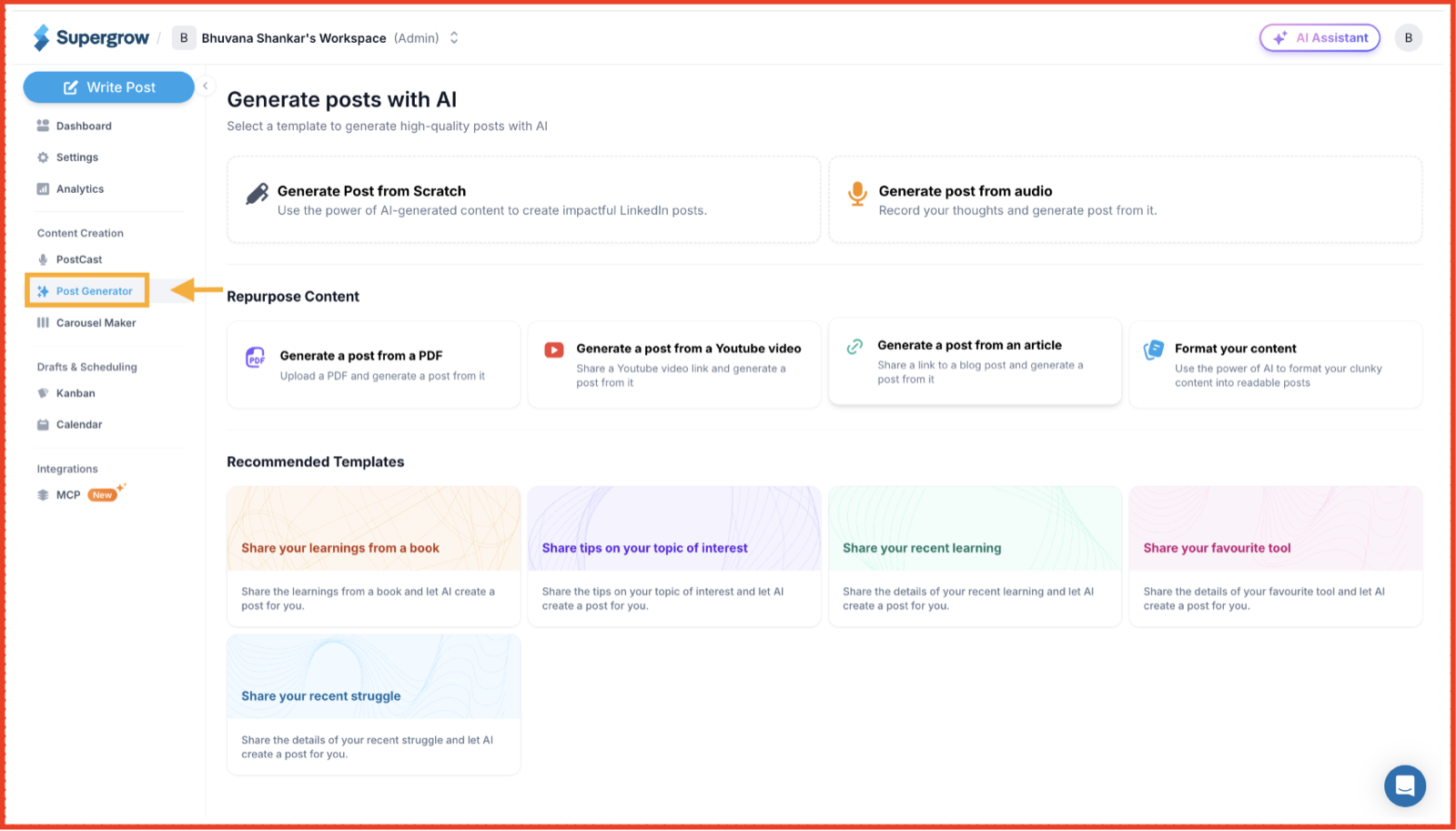
Repurposing does the same for what the team has already published, turning one asset into several posts across different people without any of them starting from scratch.
The distinction is simple. A blank prompt asks AI to make something up. Real material asks it to translate something true. Only one of those survives the feed.
Rule 3: Keep a Human in the Approval Path
AI made it trivial to publish faster than anyone can read. That is the danger. When drafting takes seconds, the temptation is to let posts go straight out, and at team scale that means content reaching LinkedIn in your employees' names that nobody actually checked.
Speed is not the goal. Judgment is.
A model can assemble a competent post, but it cannot tell that a claim is slightly off, that a stat is stale, or that a line reads as tone-deaf given what the company shipped last week.
So the rule is that AI drafts, a human approves. Not as administrator, but as the one checkpoint between fast content and content you would stand behind.
Supergrow's employee advocacy tool, Content Board, gives that checkpoint a place to live.
Every draft moves through clear stages, from draft to review to approved, with feedback attached to the post. A reviewer signs off before anything publishes, so scale never comes at the cost of a post going out unread.
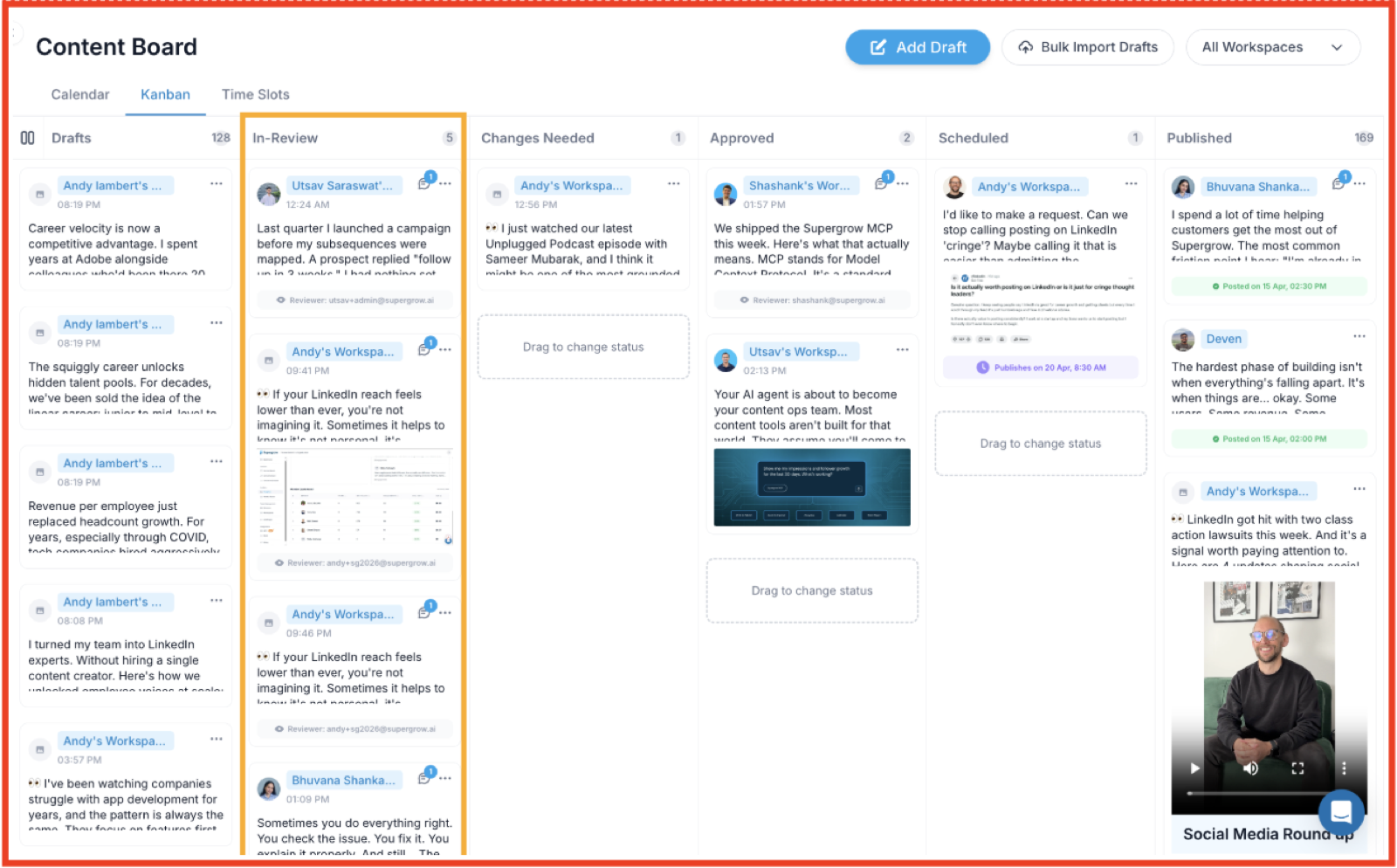
The line to hold is this. AI can write faster than you can review. That is exactly why the review cannot be the step you drop.
Rule 4: Give the Team Something to Say
Most advocacy content stalls before AI ever enters the picture. The employee sits down, has no idea what to post, and either skips it or asks a model to invent a topic out of thin air. That second path is where slop starts, and it traces back to a blank calendar, not a bad writer.
The fix sits with the program, not the person. When people are given a relevant starting point, a prompt tied to something happening in the business or their field, they write from a real reaction rather than asking AI to manufacture one. The idea comes first. AI helps shape it. That order keeps the substance human.
A Content Library and shared inspiration exist for exactly this. An admin shares ideas and angles with the whole team or specific people, so nobody faces an empty box.
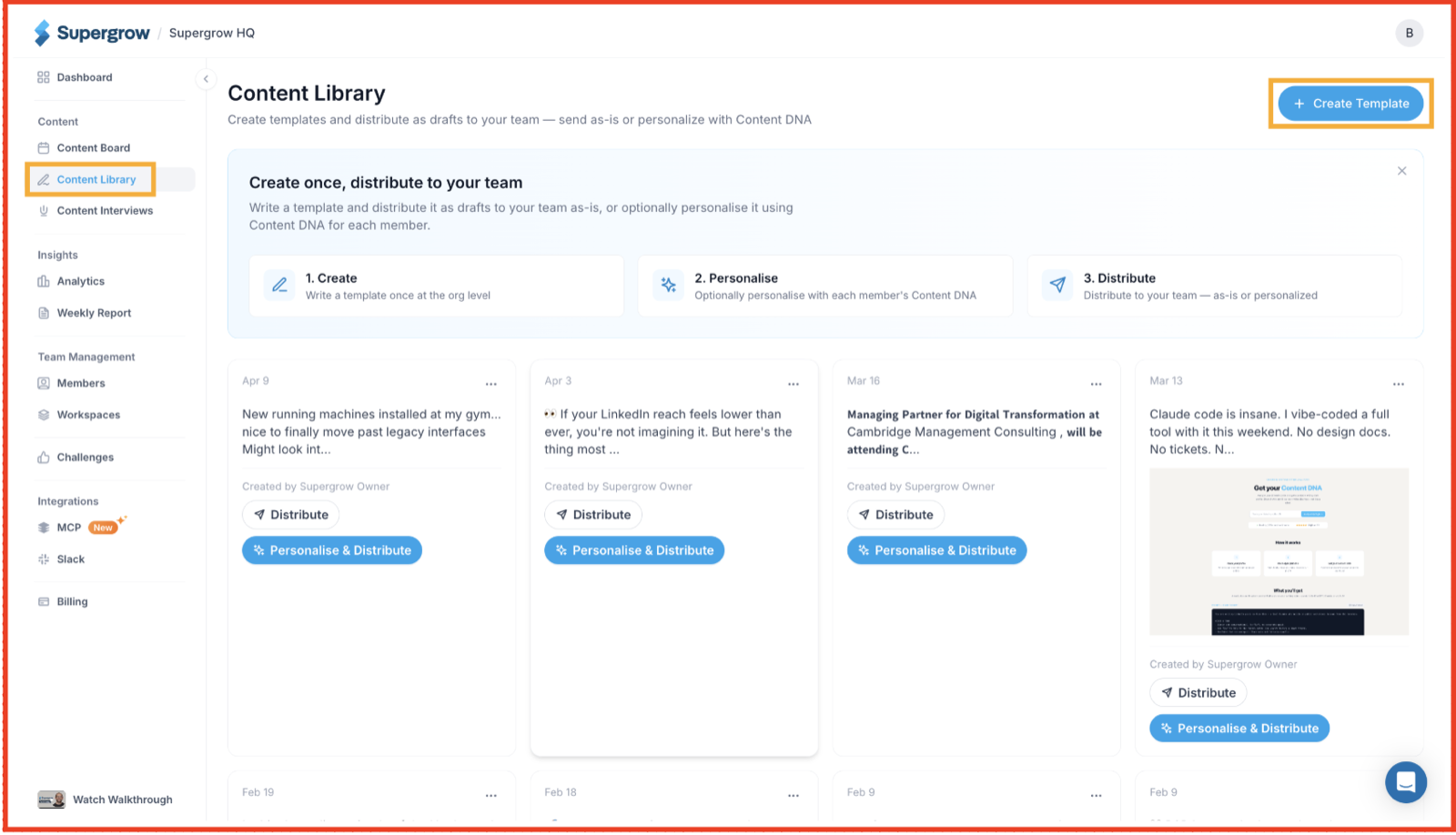
A strong post from one member can be shared across the team as a starting point for others to adapt to their own voice rather than copy. The team always has something real to react to.
Rule 5: Use AI to Stay Consistent, Not to Post in Bulk
Here the temptation flips. Once AI can generate 10 posts per minute, the instinct is to flood the feed.
That is the exact behavior LinkedIn is now built to catch. The platform blocks and buries posting at scale with little human involvement, and it is the fastest way to burn a program's credibility.
Consistency is not volume. A program works when the same people show up regularly with something worth reading, not when the feed is stuffed with machine-made filler.
The job AI should do here is remove the friction that breaks consistency: the blank page and the manual scheduling, so real posting becomes sustainable. It should not manufacture activity for its own sake.
Supergrow draws that line deliberately. Scheduling and the team calendar let people plan a steady cadence and hold it without posting by hand each time.
Challenges and leaderboards keep participation alive with streaks and automated reminders, so momentum comes from people staying in the habit rather than from a bot filling slots.
Rule 6: Measure Whether It Still Sounds Like Them
The other five rules set up the content. This one checks whether it is working, and most programs skip it entirely. They track posts published and reach, but never what actually drives both: does the content still sound like a real person?
By the time slop shows up as falling views, the damage is already weeks old.
You cannot fix what you are not measuring. A program can drift toward generic slowly, one rushed post at a time, and no single post looks like the problem.
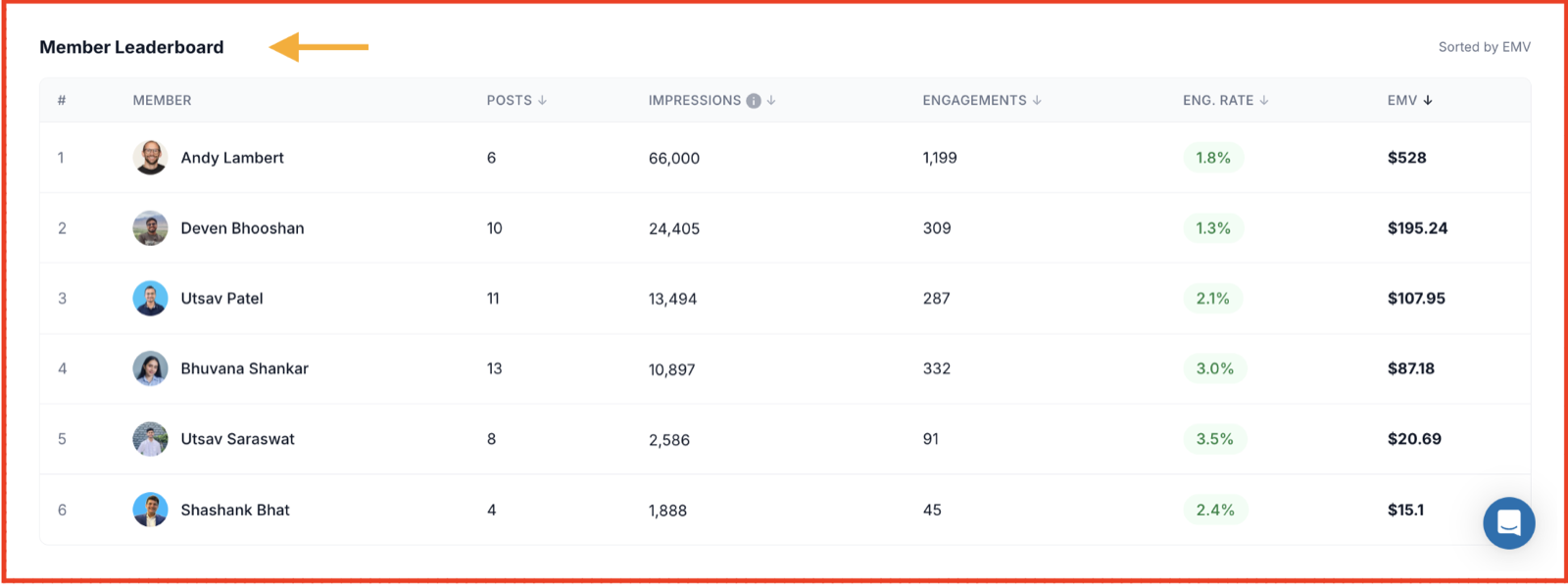
What you need is a view across the team, so a member sliding into flat, templated content shows up before LinkedIn's classifier makes the call for you.
Team Analytics gives that view. Participation Health sorts every member by how active and effective they are, so a fading contributor is visible early.
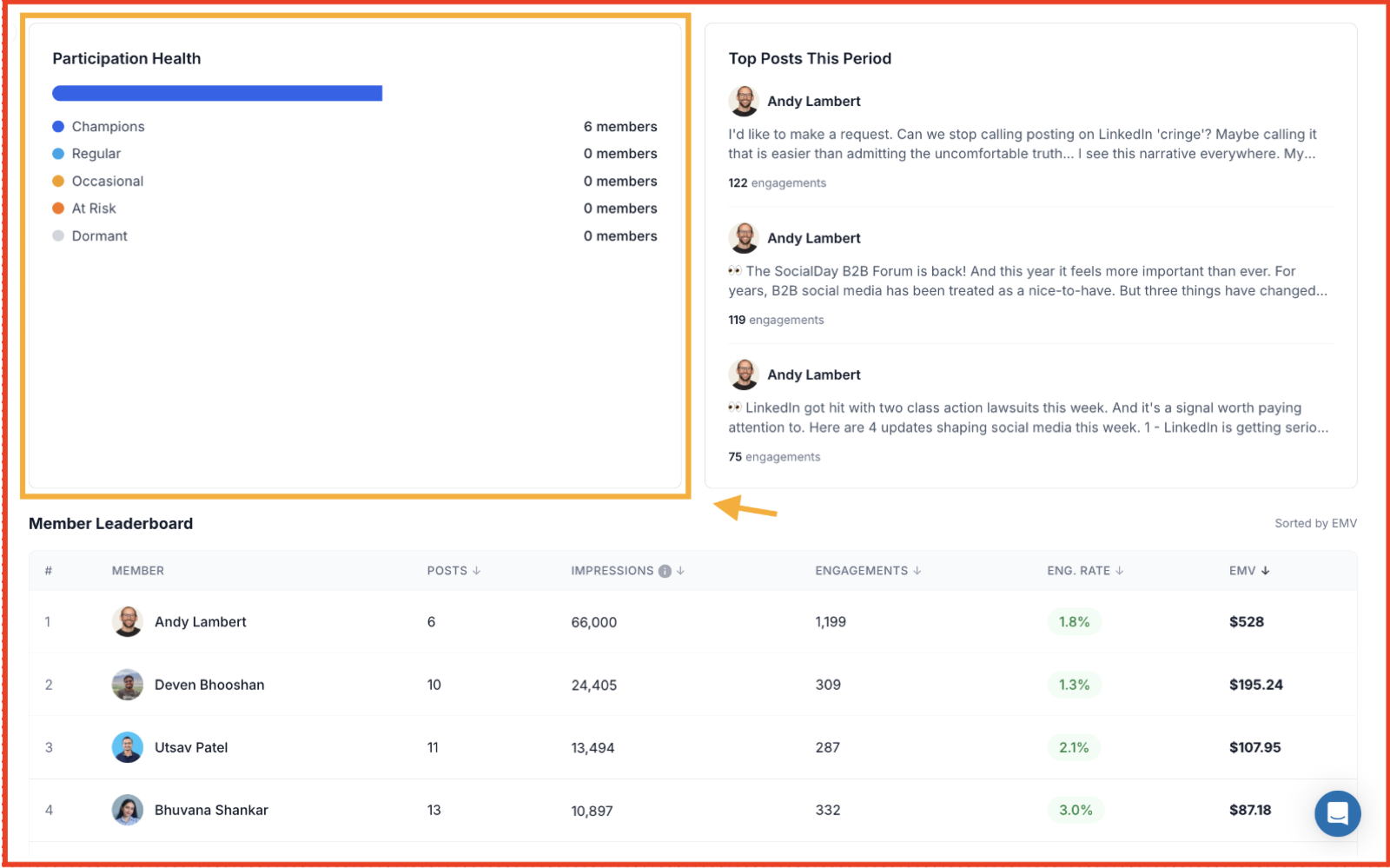
Weekly Reports surface what actually worked, the posts and angles that earned real engagement, so the team repeats what sounds human instead of guessing. You are measuring voice quality, not just output quantity.
The rule is a discipline. Authenticity is not a one-time setting you switch on at launch. It is a number you keep an eye on, because the drift toward slop is gradual and quiet until it is not.
Rule 7: Let AI Run the Work, Not Write the Voice
Everything the last six rules protect comes down to one line: AI is good at the work around the content and dangerous when it replaces the content itself. The final rule is to put it firmly on the right side of that line.
AI can take a lot of real work off your plate. Pulling this week's numbers, checking who has posts queued, flagging drafts that need review, drafting a first pass from an idea the person already gave you. None of that touches voice. All of it eats hours a program manager does not have.
Supergrow's MCP is built for exactly that division. You run these tasks from the AI client your team already uses, Claude or ChatGPT, pulling analytics and drafting against each person's own voice profile.
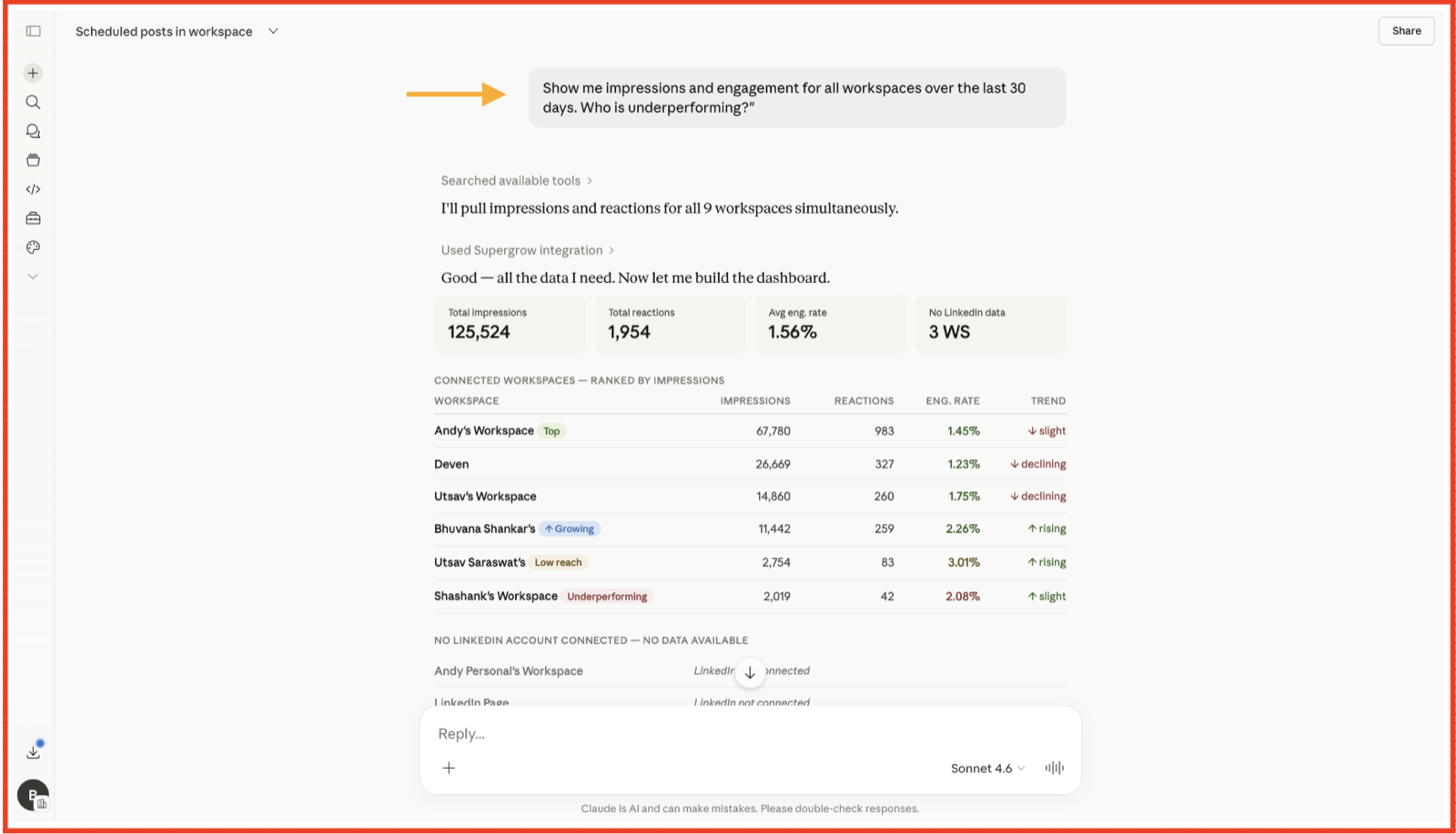
The guardrail is the point: it can draft, schedule, and queue, but nothing is published without a person's approval. AI handles the operation. The human keeps the voice.
That rule underpins the whole article. Hand AI the logistics, and it saves you real time. Hand it the voice and it costs you the trust the program was built to earn.
Grow Employee Advocacy Without the Slop, With Supergrow
An employee advocacy program is not random content. You built it to earn reach, trust, and pipeline through real voices, and slop quietly takes all three back.
The teams that will pull ahead are not the ones posting the most. They are the ones whose people still sound like themselves while everyone else blends into the same AI voice. That gap will decide who gets seen on LinkedIn and who gets filtered out.
Supergrow, the LinkedIn-first employee advocacy platform, helps your team stay on the right side.
Start a 7-day free trial. No credit card. Sign up here.