
LinkedIn posts have traditionally belonged to one member or Company Page. You could mention another person, tag a partner, or ask someone to reshare the post, but the original author remained the only name attached to it.
LinkedIn’s Add Collaborators feature changes this. It allows one member or Company Page to create a post and invite up to five other members or Pages as collaborators. Once they accept, their names appear on the post, and the same post becomes associated with their profiles or Pages.
The feature is officially called Collaborative Posts. Although LinkedIn has announced it globally, access is still rolling out gradually. On accounts where it is available, the Add collaborators option now appears directly inside the post composer.
When It All Began
LinkedIn first announced Collaborative Posts on June 22, 2026.
The initial test involved a small group of creators and brands attending Cannes Lions. LinkedIn presented the feature as a way to recognize the people and organizations involved in product launches, partnerships, company milestones, and other shared work.
At this stage, LinkedIn confirmed that members and Company Pages would eventually be able to publish posts together. It also showed that collaborators would be listed at the top of the post.
However, several practical details were still unclear. LinkedIn had not publicly confirmed how many collaborators could be invited, who could edit the post, or which accounts would receive access first.
LinkedIn Expands the Feature in July
On July 23, 2026, LinkedIn announced that Collaborative Posts were being introduced globally.
This update confirmed several important details. Members and Company Pages could invite up to five collaborators, and the feature would support most standard LinkedIn post formats. These include text posts, images, videos, documents, links, polls, events, and celebration posts.
LinkedIn also published more detailed Help Center documentation covering the creation process, collaborator permissions, Page participation, analytics, and removal options.
Despite the global announcement, the rollout remained gradual. LinkedIn’s current Collaborative Posts guidance still notes that the feature may not be available to every member.
This means the feature has launched, but access can still differ between accounts.
The Add Collaborators Button Is Now in the Post Composer
The Add collaborators option is appearing directly inside the post composer for accounts with access.
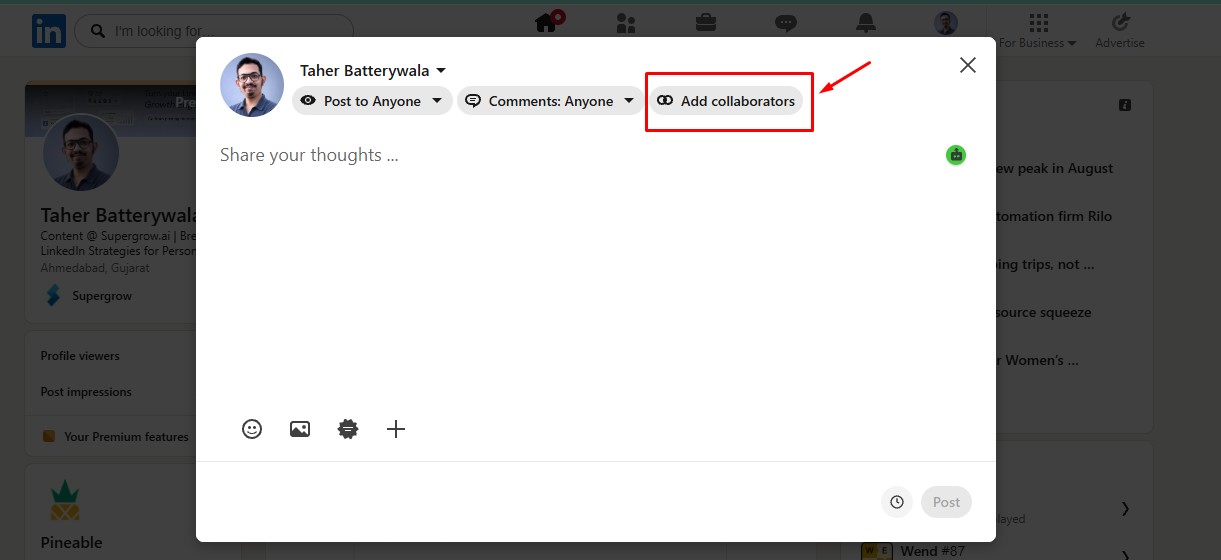
This is how you can create collaborative posts:
- Click Start a post on the LinkedIn homepage.
- Write your post and add any images, videos, documents, links, polls, or other supported media.
- Click Add collaborators beside the audience and comment settings.
- Search for eligible connections or Company Pages. You can invite up to five collaborators.
- Select the accounts and click Save.
- Set the post visibility to Anyone, as Collaborative Posts must be public.
- Review the content and click Post.
- LinkedIn notifies each collaborator, who can accept or decline the invitation.
Each invited collaborator receives a notification and can accept or decline the invitation.
If they accept, their name appears on the post, and the post becomes associated with their profile or Page. If they decline, the post remains on the creator’s profile without them.
A Collaborative Post Is Different From a Tag
Tagging someone in a post identifies or mentions them, but it does not make them an author. The tagged person does not need to approve the mention, and their name does not appear in the post’s byline.
A Collaborative Post requires an invitation and acceptance. By accepting, the collaborator agrees to have their name and profile associated with the post.
This makes the feature more suitable for work that genuinely involves multiple parties. For example, a company and its founder could publish a product announcement together. Two businesses could share a partnership update, or a webinar host could publish a recap with the participating speakers.
The distinction is simple: use a tag when you are mentioning or crediting someone. Use Add Collaborators when the post represents shared work and every invited person is willing to be publicly associated with it.
What Collaborators Can and Cannot Control
Collaborative Posts provide shared attribution, but they do not provide shared editing.
Only the account that creates the post can edit its text or media. The creator also controls which collaborators are added or removed, including changes made after publication.
Collaborators can accept or decline an invitation. After accepting, they can remove themselves from the post at any time. Removing themselves takes their name off the post, ends its association with their profile or Page, and removes their access to its engagement metrics.
The original creator remains responsible for ensuring the post follows LinkedIn’s content policies. This makes it important to agree on the final copy before publishing. Every collaborator should be comfortable with the claims, examples, and language attached to their name.
Company Pages require an additional step. A Page administrator must accept the invitation on behalf of the Page. LinkedIn also notes that engagement metrics are not available in the same way when a Page is added as a collaborator instead of creating the post.
When Should You Use Add Collaborators?
Collaborative Posts work best when the people or organizations involved are central to the story.
Suitable examples include:
- A joint product or feature launch
- A business partnership announcement
- Results from a shared project
- A customer or community success story
- A webinar, podcast, or event recap
- A company milestone involving specific team members
- A founder and Company Page publishing the same announcement
Before publishing, decide which account should create the post. The creator keeps editing rights, manages collaborators, carries policy responsibility, and receives the most complete control over the post.
Avoid adding collaborators only to reach a larger audience. A shared byline signals professional association and approval. Inviting someone who had little involvement in the subject can make the post feel promotional and create unnecessary reputational risk for both parties.
Collaborative Posts must also be public, so they are unsuitable for updates intended only for your connections or a limited audience.
How Supergrow Can Support the Collaboration Workflow
LinkedIn handles the final invitation and shared byline. Supergrow’s employee advocacy platform can help teams prepare the content before it reaches the LinkedIn composer.
PostCast can capture the perspectives of the people involved through guided conversations. Content DNA helps turn those insights into drafts that reflect each contributor’s natural voice. Marketing teams can then use the Content Board to organize the post, collect feedback, and confirm that every collaborator approves the final version.
This preparation is important because LinkedIn does not provide a shared drafting environment. Only the creator can edit the published post. Our content approval workflow gives contributors and reviewers a place to resolve changes before one person publishes the approved copy and sends the collaboration invitations.
The result is a clearer division of responsibilities, with Supergrow supporting expertise capture, drafting, and approval while LinkedIn provides the shared post and public attribution.
Start your free trial to plan, review, and approve collaborative LinkedIn content in one place.