
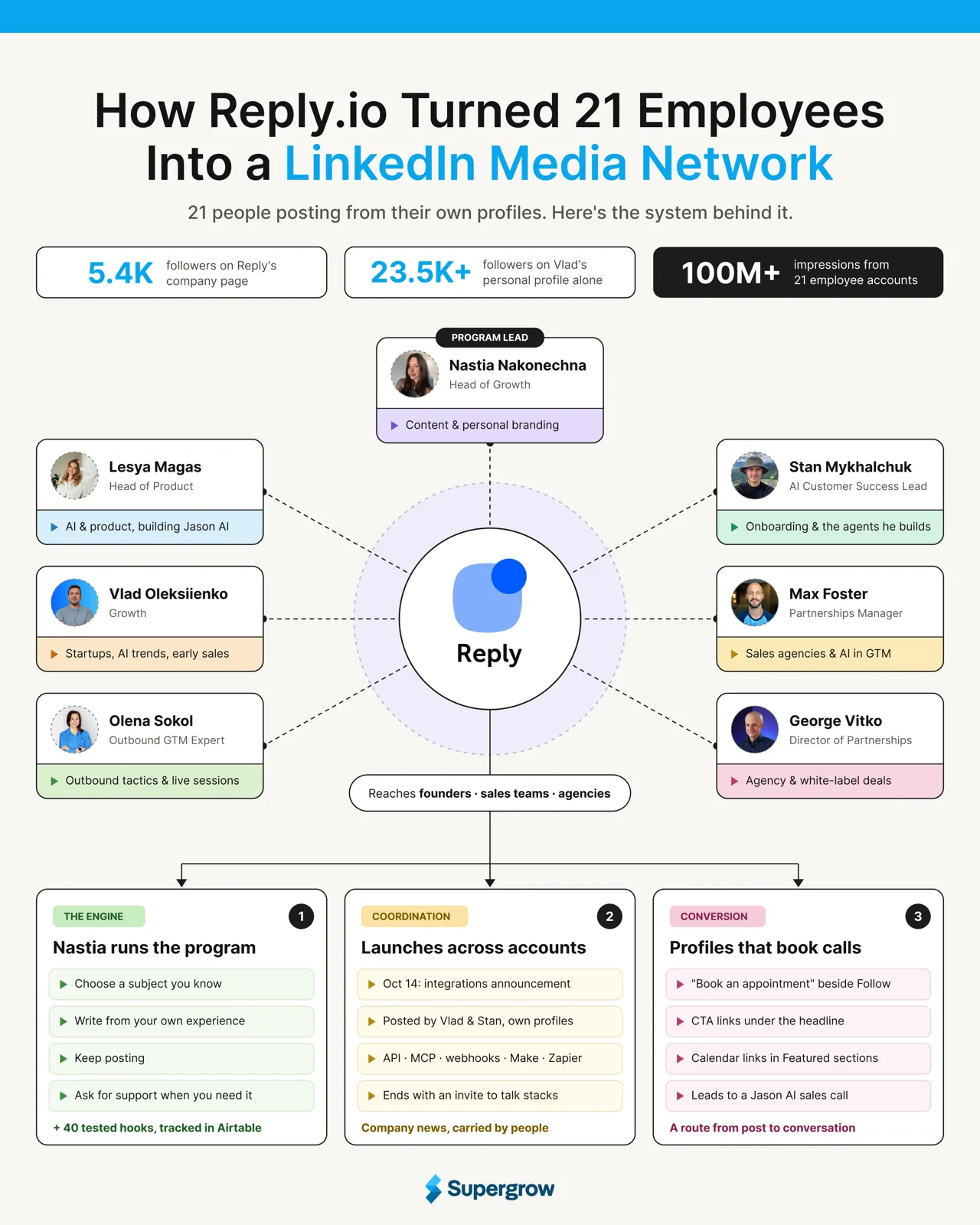
Reply.io is sales engagement software that helps teams contact prospects by email, LinkedIn, phone, and SMS. The company’s LinkedIn page has about 5,400 followers in October. Vlad Oleksiienko, who works on Reply’s growth team, has more than 23,500.
Vlad is one of 21 employees who publish from their own accounts. Reply’s Head of Growth, Anastasiia Nakonechna (Nastia), runs the program. She helps colleagues find ideas in their work, shape drafts, and publish regularly.
In September 2026, Vlad posted that those 21 accounts had generated more than 100 million impressions and a steady flow of warm pipeline. Here, in this breakdown, we will look at the posts and the live sessions they promote to see how the program works beyond the reach claim.
How Reply’s Team Amplified Their Reach
Vlad speaks with founders as part of his growth work. In a post about finding a startup’s first 100 customers, he shares advice and briefly mentions that some founders he talks to use Jason AI for sales.
Other employees bring different work to LinkedIn. Lesya Magas leads product and writes about AI while building Jason AI SDR. Stan Mykhalchuk works in customer success and writes about onboarding and the agents he builds. Max Foster covers agency partnerships, while Olena Sokol teaches outbound and hosts Reply’s live sessions.
Nastia has named these colleagues in a post about the program.
What Employees Write About
Each employee writes about their work at Reply. They also put different parts of the business in front of different LinkedIn audiences.
| Team Member | Role | Topics or themes they publish |
|---|---|---|
| Lesya Magas | Head of Product | AI, product management, and work culture while building Jason AI SDR |
| Stan Mykhalchuk | AI Customer Success Lead | Onboarding, customer success automation, and the agents he builds |
| Vlad Oleksiienko | Growth | Startups, AI trends, and early sales |
| Max Foster | Partnerships Manager | Partnerships, sales agencies, and AI in go-to-market work |
| George Vitko | Director of Partnerships | Agency partnerships and white-label opportunities |
| Olena Sokol | Outbound GTM Expert | Outbound tactics and live sessions |
| Nastia Nakonechna | Head of Growth | Content, personal branding, and LinkedIn growth |
Vlad’s first 100 customers post lays out what founders can do as they move from 0 to 10, 10 to 50, and 50 to 100 customers. He mentions Jason AI once while describing founders who automate sales. The post answers a specific question founders bring to someone working in growth.
How Nastia Keeps the Program Moving
Nastia leads the effort from the growth team. In a post about the program, she says Reply helps specialists publish from their own accounts. She gives them four rules. Choose a subject you know, write from your experience, keep posting, and ask for support when you need it.
Nastia also learns from the posts her colleagues publish. In February 2026, she shared 40 hooks drawn from Reply creators’ work. She said she tested the openings, tracked their results in Airtable, and organized them into a library.
How Reply Coordinates Product News Across Accounts
The accounts carry company updates alongside posts about each person’s work. On October 14, Vlad and Stan published Reply’s integrations announcement from their personal profiles. They explained six ways to connect Reply with a sales stack, including the API, MCP, webhooks, and integrations through Make and Zapier.
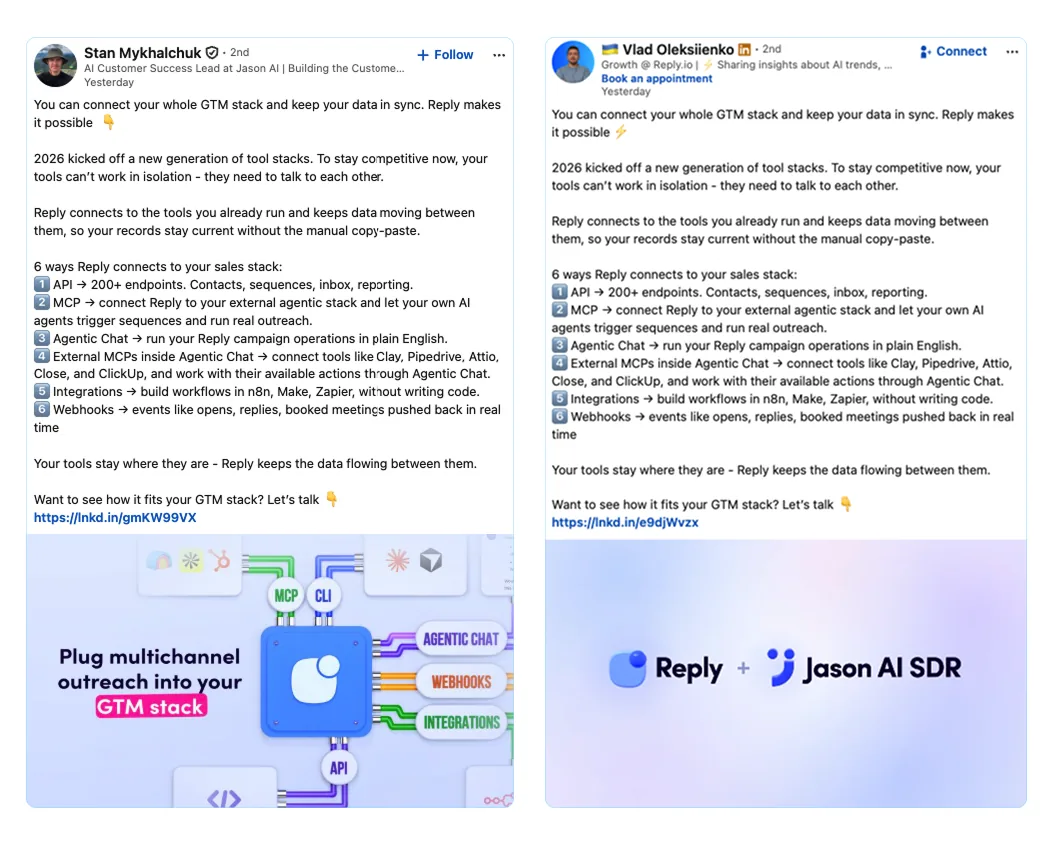
Both posts end with an invitation to discuss how Reply fits into a reader’s sales stack.
Where Employee Posts Send Interested Readers
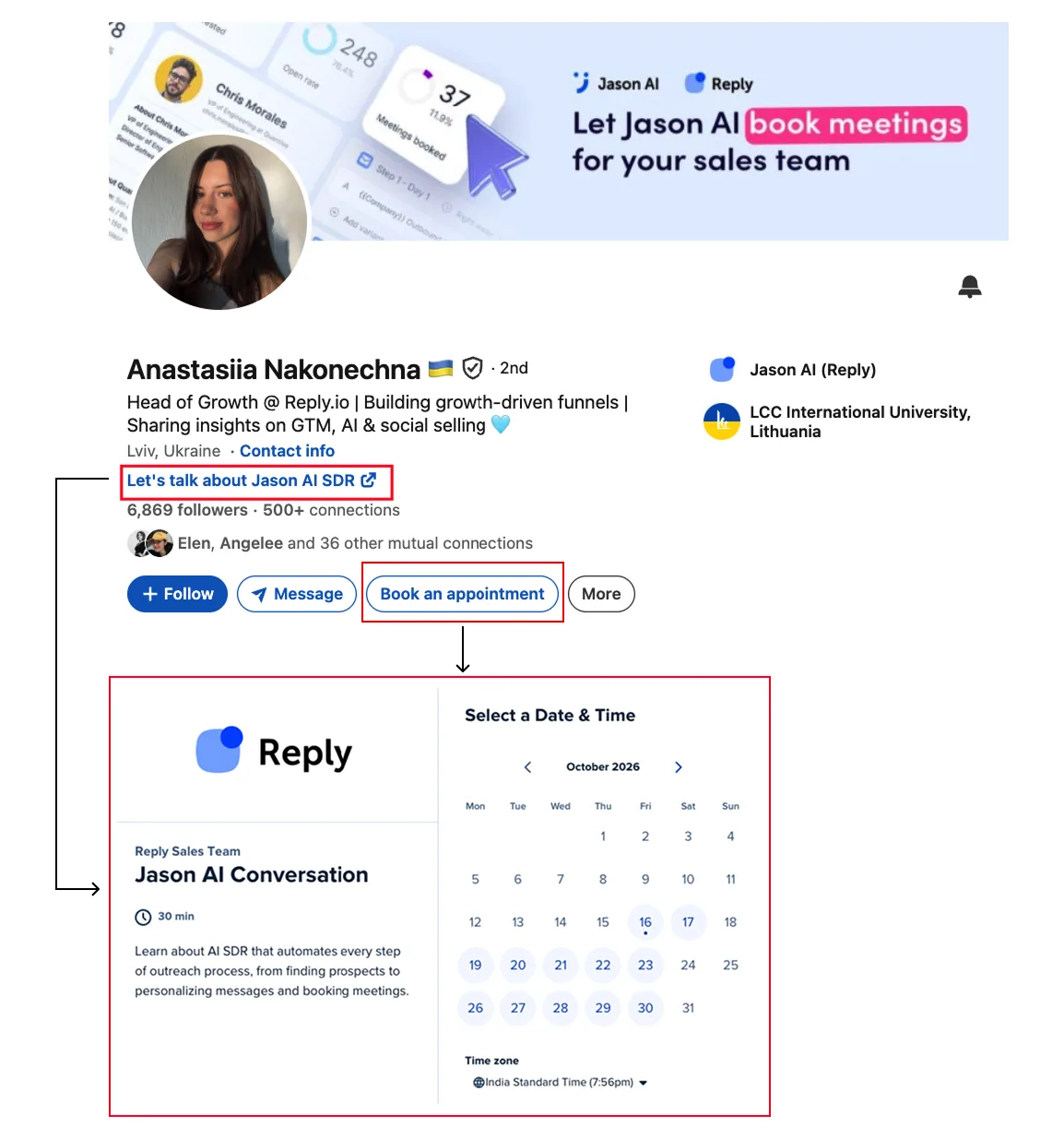
The route from a post to a conversation is visible on several profiles. Vlad, Nastia, Max, and George each have a Book an appointment button in the action row beneath their LinkedIn headline, beside Follow and Message. Each button opens a Reply sales-team Calendly page for a Jason AI conversation.
Nastia uses a second link directly beneath her headline that reads Let’s talk about Jason AI SDR.
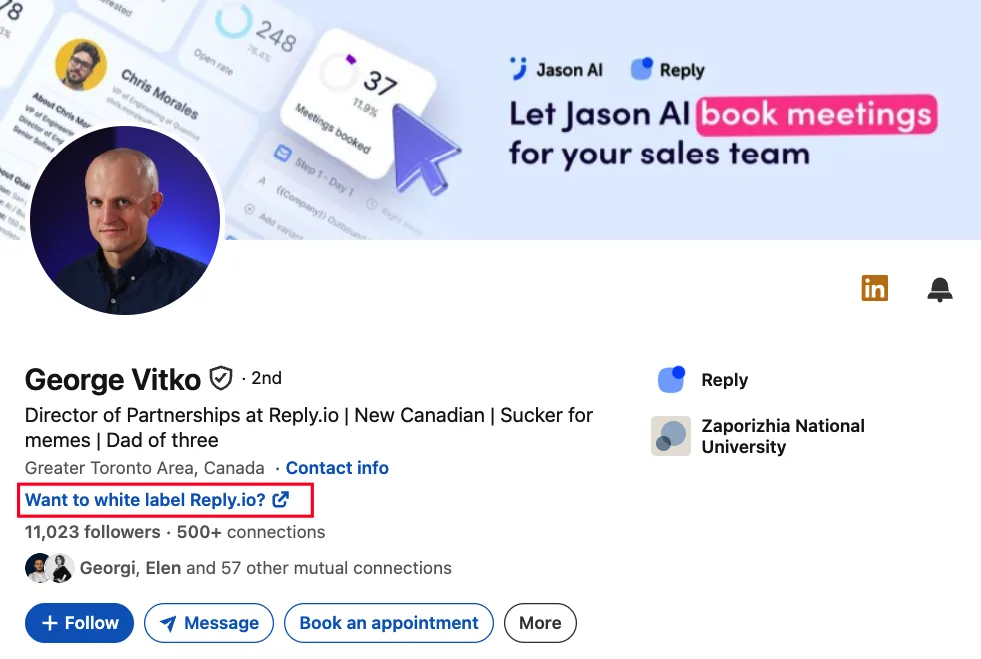
George places Want to white label Reply.io? in the same position.
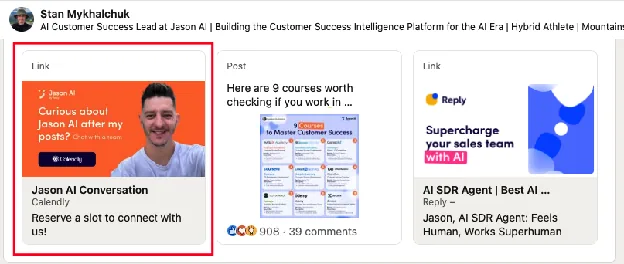
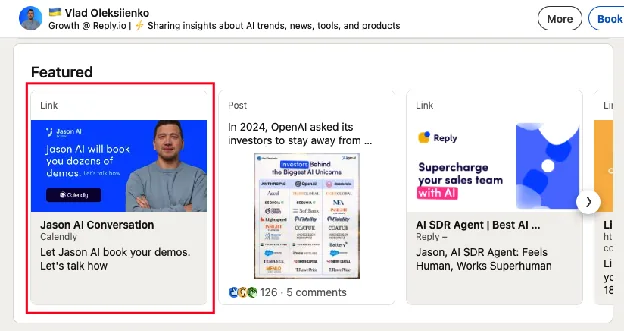
And in case somebody misses that, Stan, Vlad, and other team members have their calendar links added on the top in their featured sections.
How Reply’s Employee Program Works as a Whole
Nastia helps employees turn their work into LinkedIn posts and publish regularly. Each person writes about subjects they know from their job. Reply also uses their accounts to share company news, as Vlad and Stan did with the integrations update.
Readers who want to learn more can get a resource, join a live session, or book a conversation through an employee’s profile. That is how the parts connect: employees create and share the posts, Nastia supports them, and Reply gives interested readers a way to continue.
How to Build Your Version of Reply’s Program
Reply’s program works because each part has a clear owner and purpose, and a smaller team can start with the same foundations. The following steps show how to set them up:
Choose People With Something to Teach
You do not need 21 contributors. Start with questions buyers already ask your team. A product lead might explain decisions behind a feature. Someone in customer success might share what they have learned from onboarding. Invite employees who want to publish and can speak from their own work.
Give Them Editorial Support
Put one person in charge of collecting ideas, helping with drafts, and managing reviews. A short, regular conversation can give a specialist enough material for a post. The employee should check the facts and approve the final version before it goes out.
Give Interested Readers a Next Step
Add a relevant resource, live session, or booking link to each employee’s profile. Choose it based on what that person writes about and the questions readers are likely to bring them.
Coordinate Company News and Track What Follows
Give contributors the same verified facts about an announcement, then let each explain what matters to their audience. Track the replies, registrations, and meetings their posts generate. Use those results to decide which topics and next steps are useful.
How Supergrow Helps Run This Workflow
Reply’s program works because Nastia does three jobs. She pulls ideas out of colleagues’ daily work, keeps drafts moving, and lines up launches across accounts. Here’s how Supergrow helps an editor do each one:
1. Turn expertise into a first draft: PostCast interviews the employee about a recent project or customer question. The draft starts from what they know, which builds Nastia’s first two rules (“choose a subject you know” and “write from your experience”) into the process.
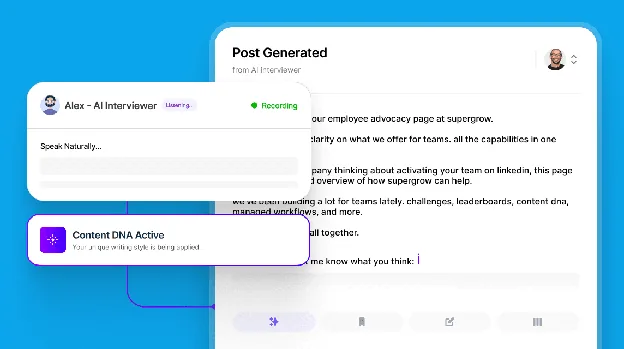
2. Keep every voice distinct: Content DNA stores each person’s audience, subjects, and voice. Stan stays on onboarding and agents for customer success leaders, and George stays on white-label deals for agencies. Seven people reach seven different audiences.
3. Spot stalled drafts before posting stops: “Keep posting” is the rule most programs break. The Content Board shows every draft, review, and scheduled post across the team, so the editor can see who has gone quiet and step in early.
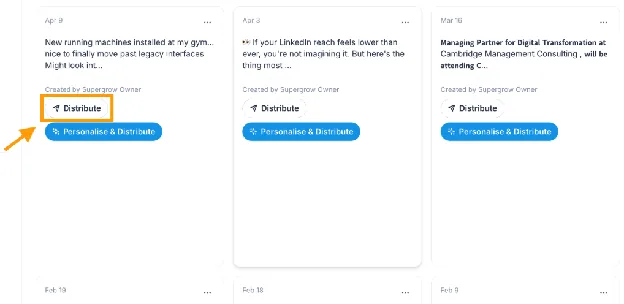
4. Run a launch like Reply’s integrations announcement: Personalize and Distribute lets an editor write one launch brief and adapt it for each member’s workspace. The editor reviews those versions before sending them on. That’s how Vlad and Stan could post the same news on the same day and still sound like themselves.
5. The expert has the final say: Each employee checks the explanation and approves the final post before it goes out. Their name is on it, so they decide what it says.
Conclusion
Reply shows what a well-run employee advocacy program can do for a brand’s visibility and pipeline. 21 employees post about the work they know best, from building Jason AI SDR to onboarding customers and supporting agency partners. Together, their accounts have brought Reply more than 100 million impressions and, as Vlad shared, a steady flow of warm pipeline every week.
The program also turns that attention into inbound conversations. A reader who finds a post useful can visit the author’s profile, book a call, join a live session, or get a resource. With Nastia supporting each creator, the posts keep going out, and Reply stays in front of its buyers week after week.
Your team can follow the same path, starting with the specialists your buyers already want to learn from.
Start your free trial to turn your team’s expertise into LinkedIn visibility and inbound leads.