
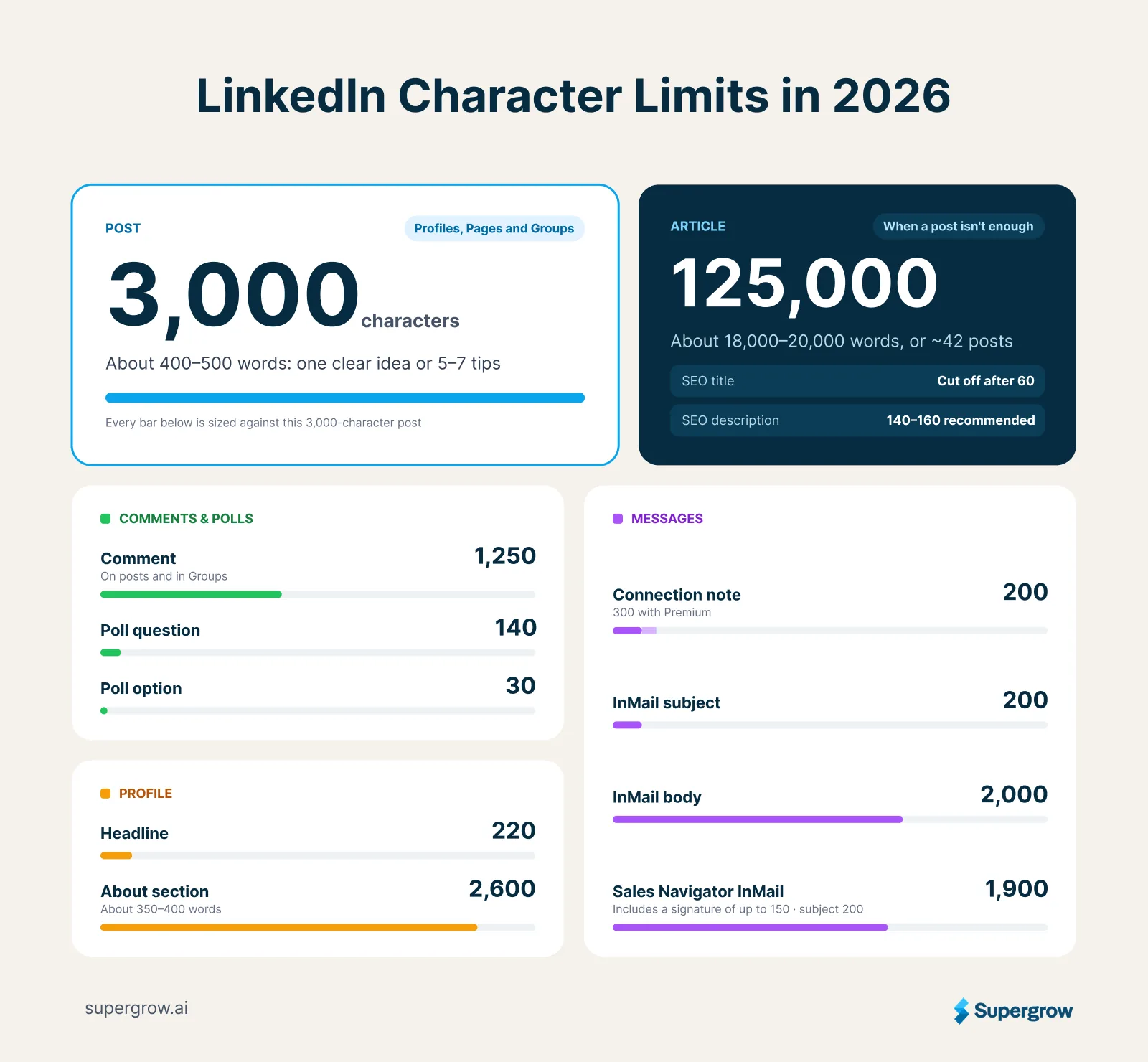
LinkedIn character limits set how much you can write in each part of the platform, from posts and comments to your headline, About section and messages. A LinkedIn post can hold up to 3,000 characters, which is roughly 400 to 500 words.
Knowing the exact limit for each field saves you from trimming a draft at the last minute. It also helps you plan what people see before "see more," and how much room bold text and emoji take up.
Below you'll find every limit, how much of your post shows in the feed, how to use your opening lines, and how to pick the right length for each kind of post.
What is Post Character Limit on LinkedIn?
A LinkedIn post can contain up to 3,000 characters, whether you post from a personal profile or a company Page. That's roughly 400 to 500 words, enough for one well-explained idea, a short story with a lesson, or five to seven practical tips.
For anything longer, write a LinkedIn article. Articles allow up to 125,000 characters, roughly 18,000 to 20,000 words, which is plenty for a full guide, a case study or a long report.
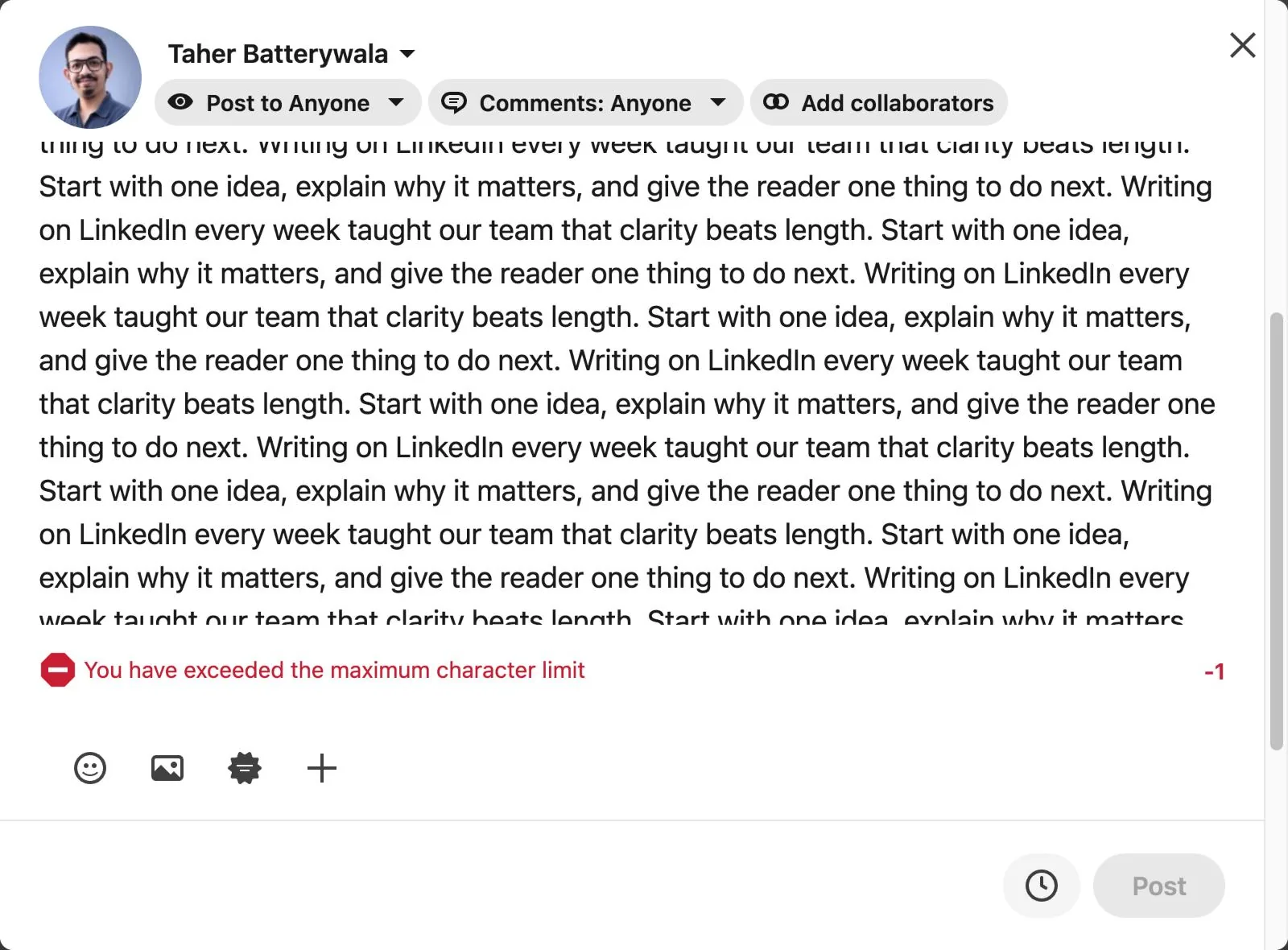
LinkedIn stops you the moment you go over. At 3,001 characters, the post box shows "You have exceeded the maximum character limit," a red counter shows how far over you are, and the Post button turns off.
Character Limits for Every LinkedIn Text Field
LinkedIn sets a separate limit for each text section you write. Keep this table handy before you draft a post, update your profile or send a message.
| Field | Character limit |
|---|---|
| Post (personal profile or Page) | 3,000 |
| Article | 125,000 |
| Article or newsletter SEO title | Cut off after 60 |
| Article or newsletter SEO description | 140 to 160 recommended |
| Poll question | 140 |
| Poll option | 30 |
| Comment on a post | 1,250 |
| Group post | 3,000 |
| Group comment | 1,250 |
| Headline | 220 |
| About section | 2,600 |
| Connection invitation note | 200 on a free account, 300 with Premium |
| InMail subject | 200 |
| InMail body | 2,000 |
| Sales Navigator InMail subject | 200 |
| Sales Navigator InMail message | 1,900, including a signature of up to 150 |
LinkedIn flags the two most common limits as soon as you cross them:
- Comments: at 1,251 characters, LinkedIn shows "Exceeded the maximum character limit." and turns off the Comment button.
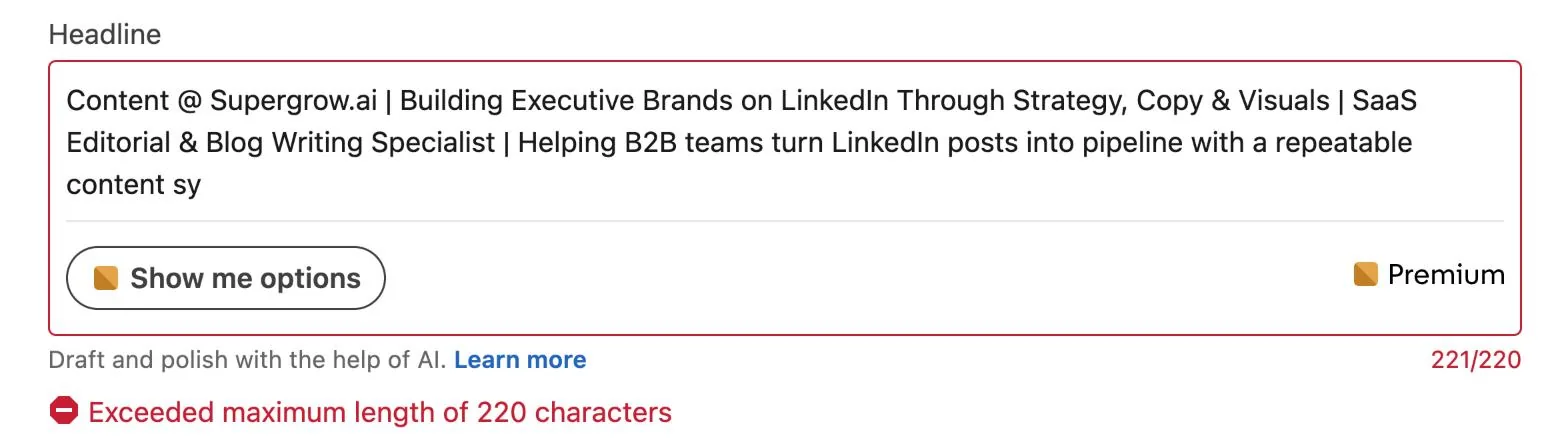
- Headline: at 221 characters, LinkedIn shows "Exceeded maximum length of 220 characters" and won't save the change.
Your headline and About section do most of the work on your profile. With 220 characters, your headline should say what you do and who you help. So "Account Executive at Supergrow | Helping B2B teams turn employee posts into pipeline" is much more effective than a job title alone.
The About section gives you roughly 350 to 400 words to explain the problem you solve and the results you've delivered. A few small changes go a long way when you optimize your LinkedIn profile around those two fields.
Connection notes need you to be really scrappy with your writing. A free account lets you add a personal note to three invitations a month, up to 200 characters each. LinkedIn Premium raises that to 300 characters and lets you personalize every invitation. Say why you're connecting in one or two lines, such as a post of theirs you enjoyed or a topic you both work on, and leave the pitch for later.
What counts toward the character limit
Every character in your draft counts, not just the words:
- Spaces and line breaks: each one counts, so the white space between paragraphs uses part of your limit.
- Hashtags: every letter, plus the # symbol, counts toward the total.
- Emoji: each emoji counts as two characters.
- Bold and italic text: each styled letter counts as two characters, because it's a special Unicode character rather than a regular letter.
How Much of Your Post Shows Before "see more"
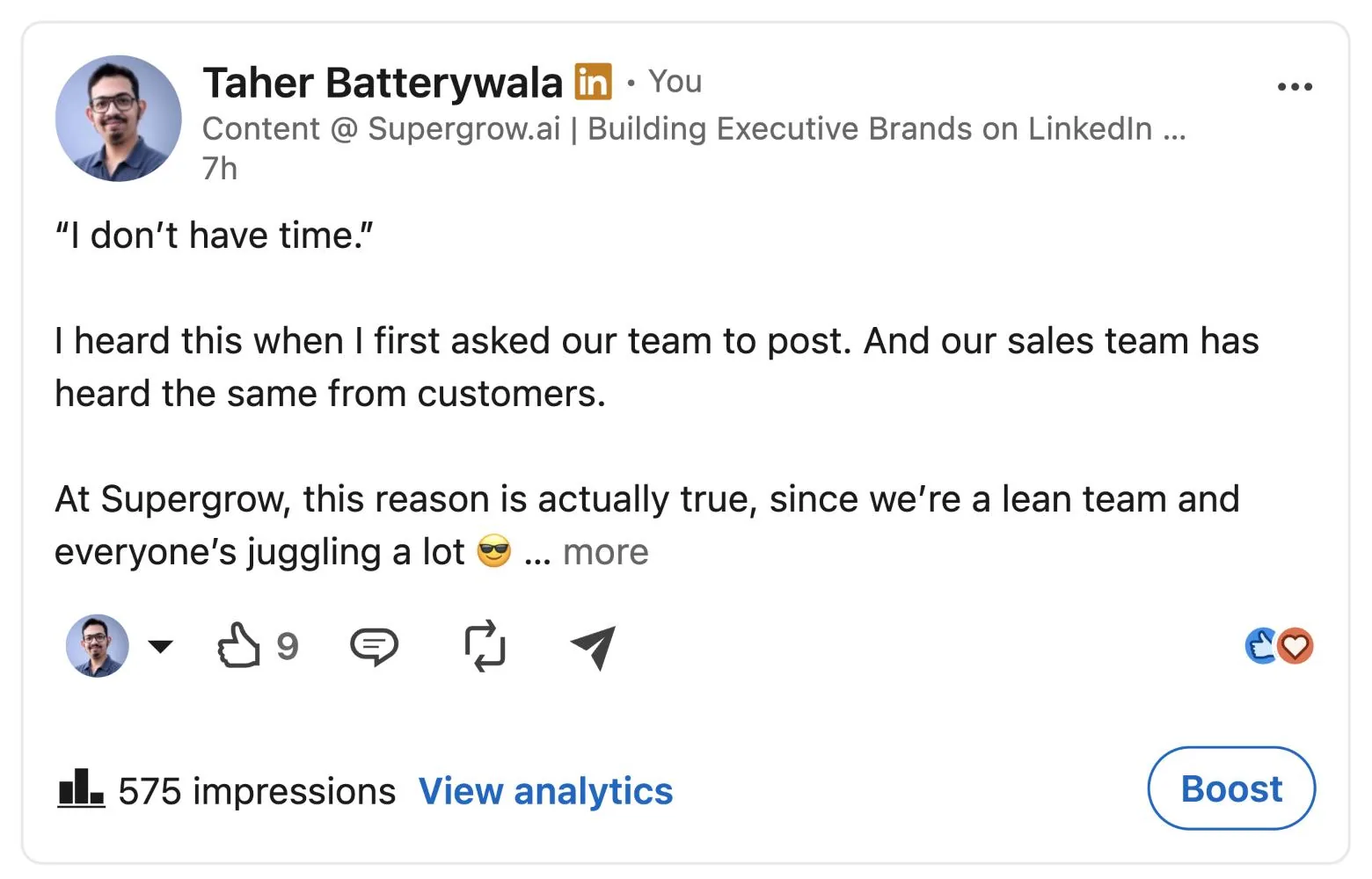
LinkedIn cuts posts by lines, not characters. On desktop, a text-only post shows 6 to 7 lines before the "…more" link, and a post with an image shows just 2 to 3. On phones, the cutoff is much sooner since the screen size is narrower.
So out of your 3,000 characters, readers see only the first few lines before they decide whether to click. Those opening lines carry the whole post.
Use Your Opening Lines for a Strong Hook
A hook is the first line or two that makes someone stop scrolling and click "…more." It works best when it gives the reader a specific reason to keep going. These openers do that well:
- A bold claim: "Most employee advocacy programs fail in the first month."
- A specific number: "We published 81 posts in one quarter. Here's what moved the needle."
- A familiar frustration: "'I don't have time to post' is the line every marketer hears."
- A result with a twist: "Our shortest post of the year got more reach than everything else combined."
- A direct question: "What would make you tell a prospect not to buy?"
The body has to deliver on the promise. A strong hook earns the click, and a strong payoff earns the follow.
Before you publish, paste your draft into Supergrow's free LinkedIn Post Preview to see exactly where it gets cut on desktop and mobile, then tighten the opening until the hook lands above the fold.
How Long Should a LinkedIn Post Be?
A LinkedIn post should be as long as its idea needs, anywhere from a single line to about 2,000 characters. Both ends work, but they do different jobs. Short posts tend to reach more people, and longer posts tend to start more conversations.
Posts from Supergrow's own team show this clearly. Taher Batterywala's biggest post of 2026 yet was a 20-character line paired with an image, and it reached 49,125 impressions.
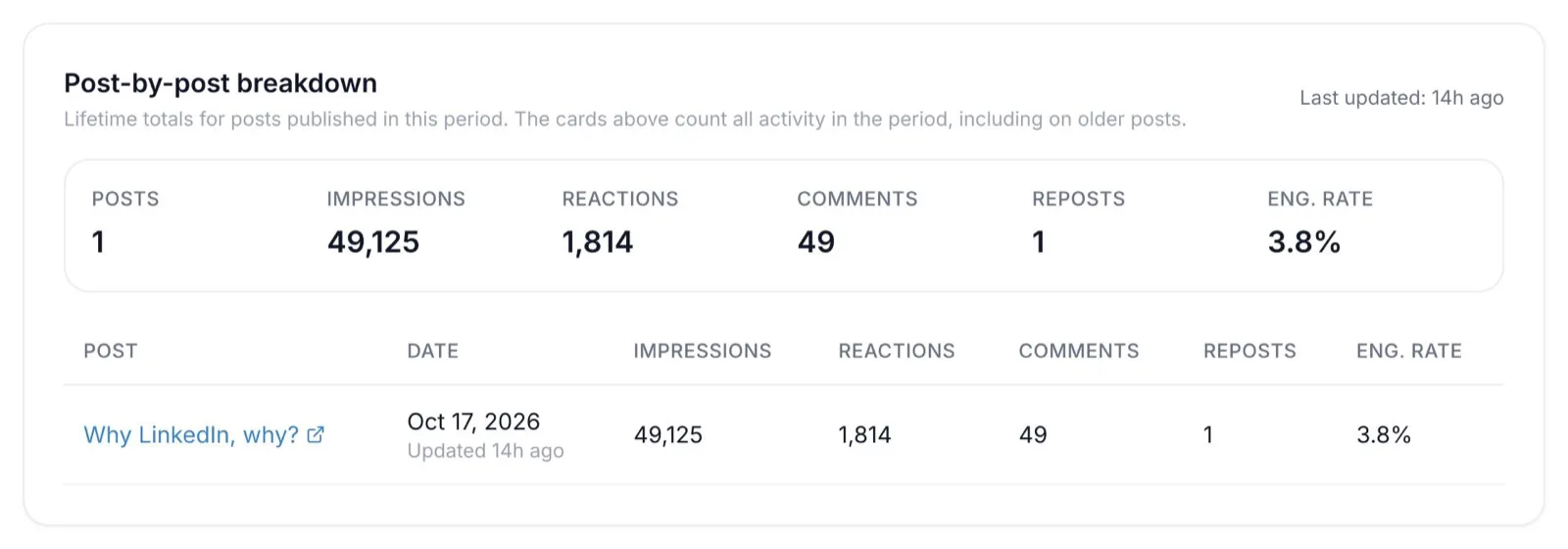
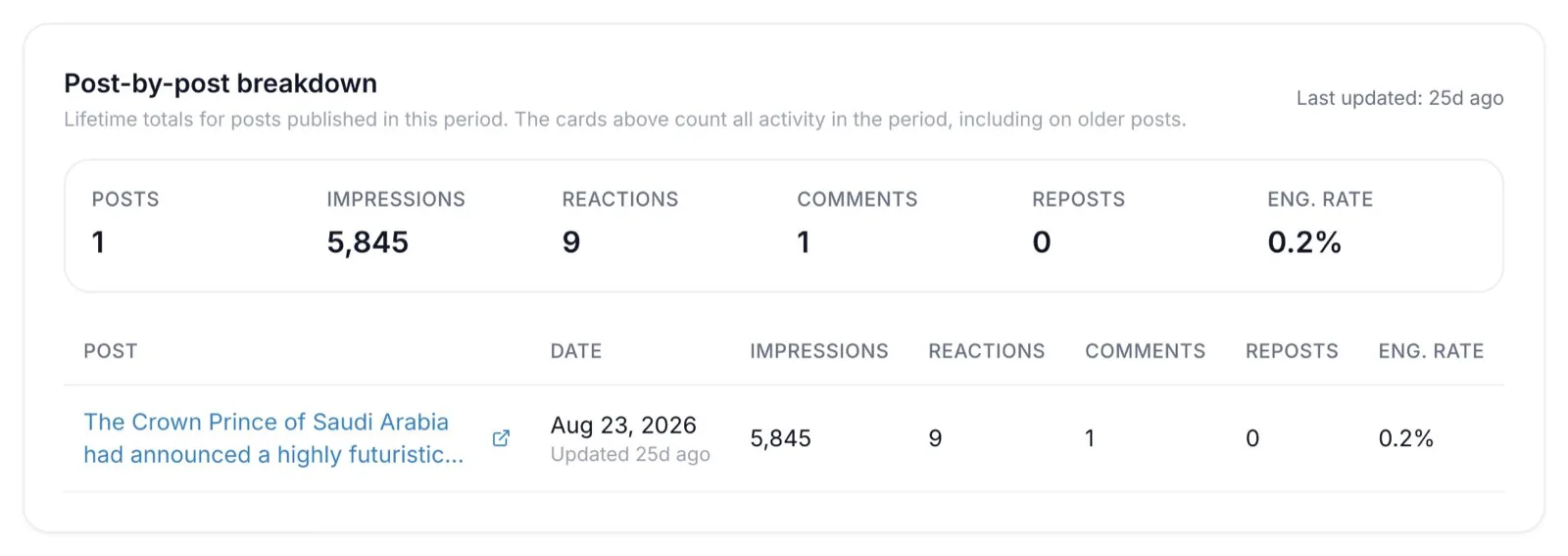
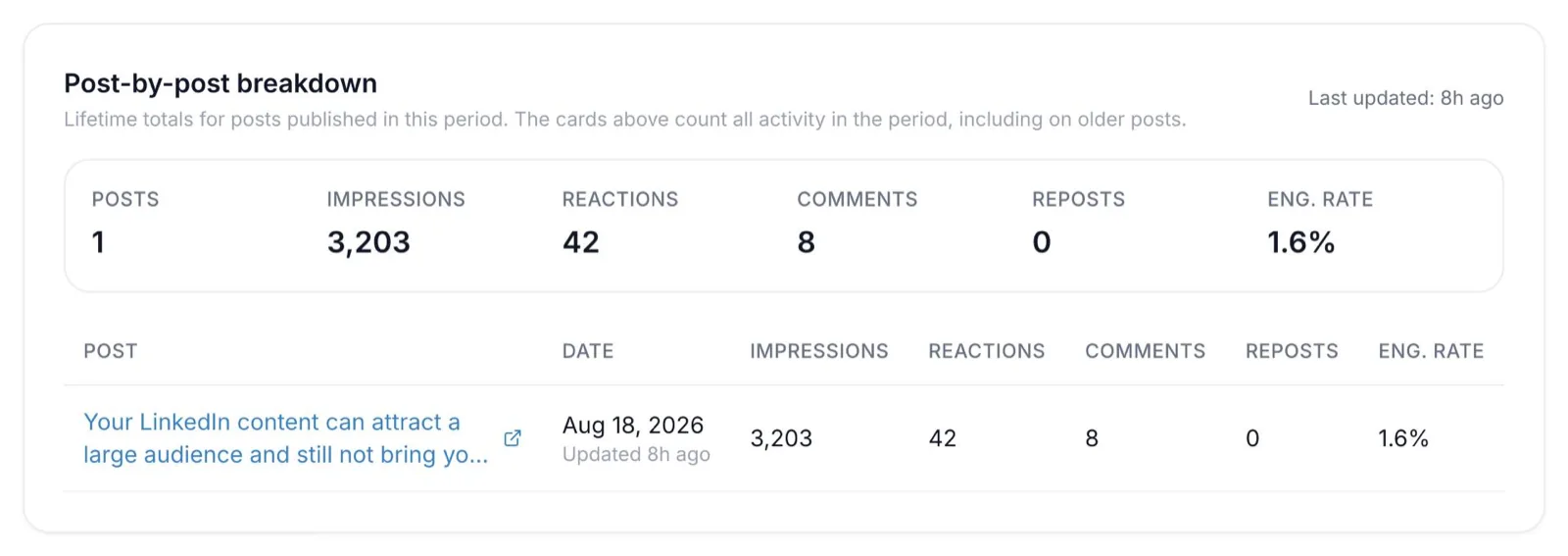
His next two best were long posts, a 1,783-character post with an image (5,845 impressions) and a 1,810-character text-only post (3,203 impressions).
One-liners With a Strong Visual
Short posts work when the idea lands in a glance. A relatable line paired with a screenshot, meme or photo gets people reacting, commenting and sharing within seconds, which is what gives these posts their reach.
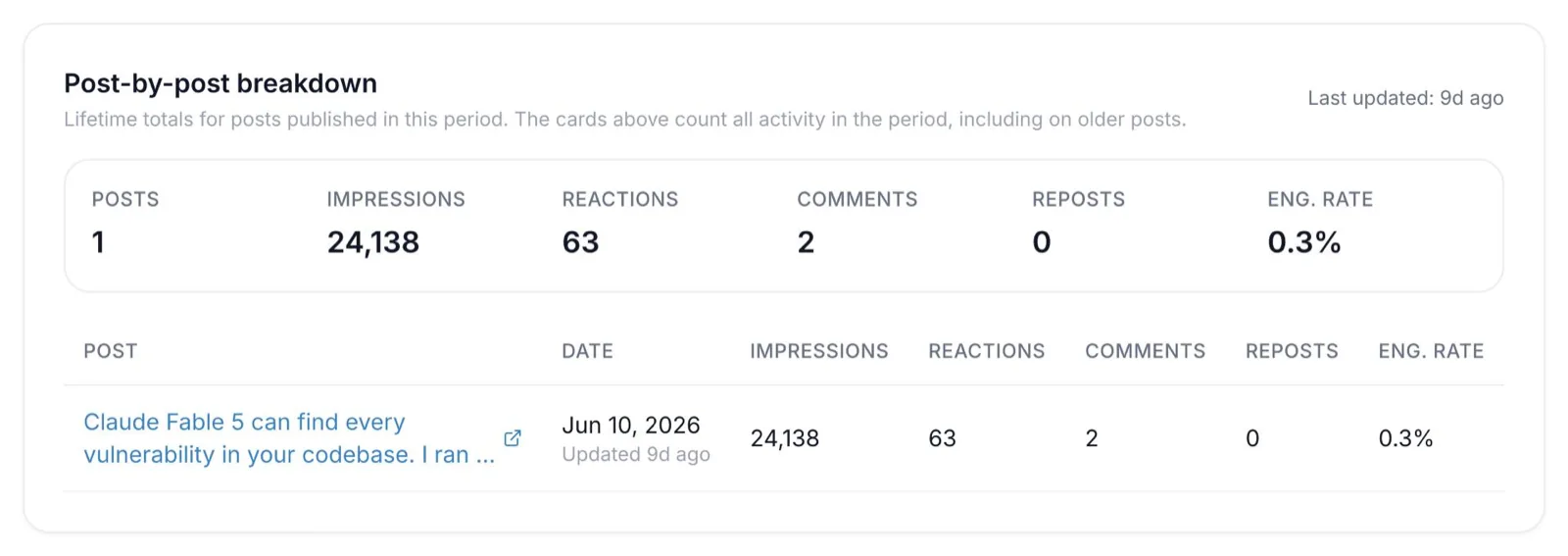
Deven Bhooshan's 163-character post on June 10, 2026 reached 24,138 impressions.
One-liners work best for observations, reactions to news, light humor and moments your audience instantly recognizes.
Mid-length Posts for Lessons and Opinions
Posts between 500 and 1,500 characters give you room for a hook, one clear point and a takeaway. This range suits lessons from your work, opinions on industry news and short how-tos.
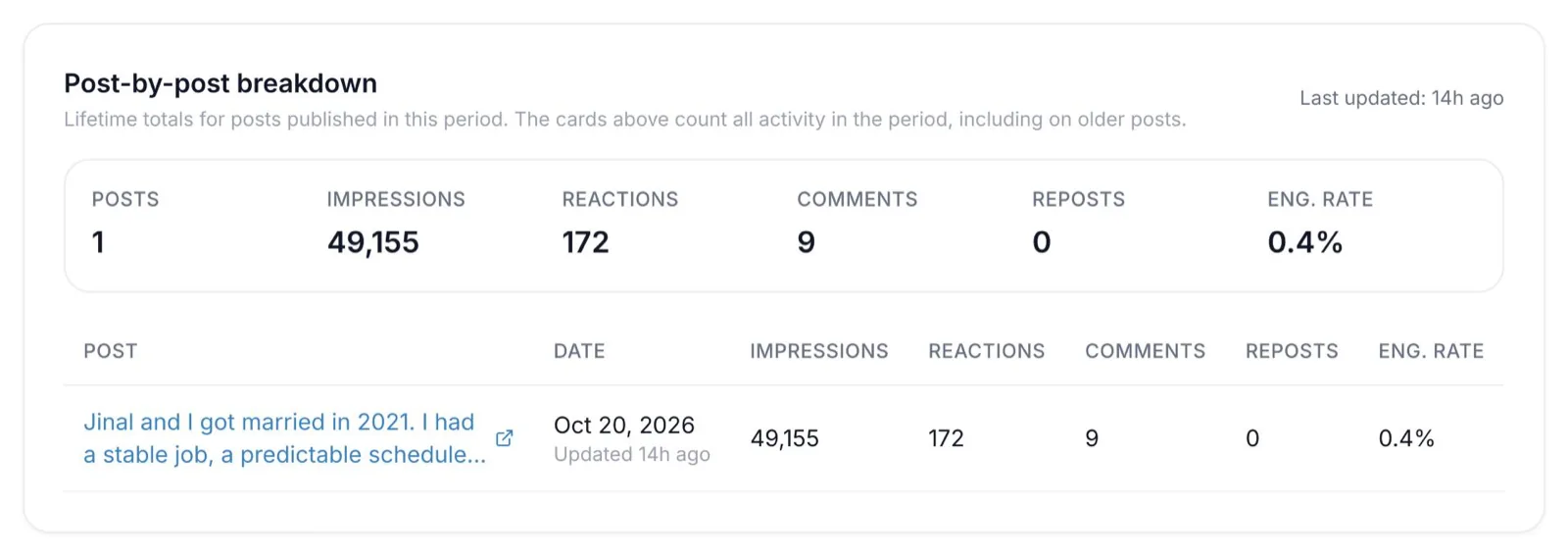
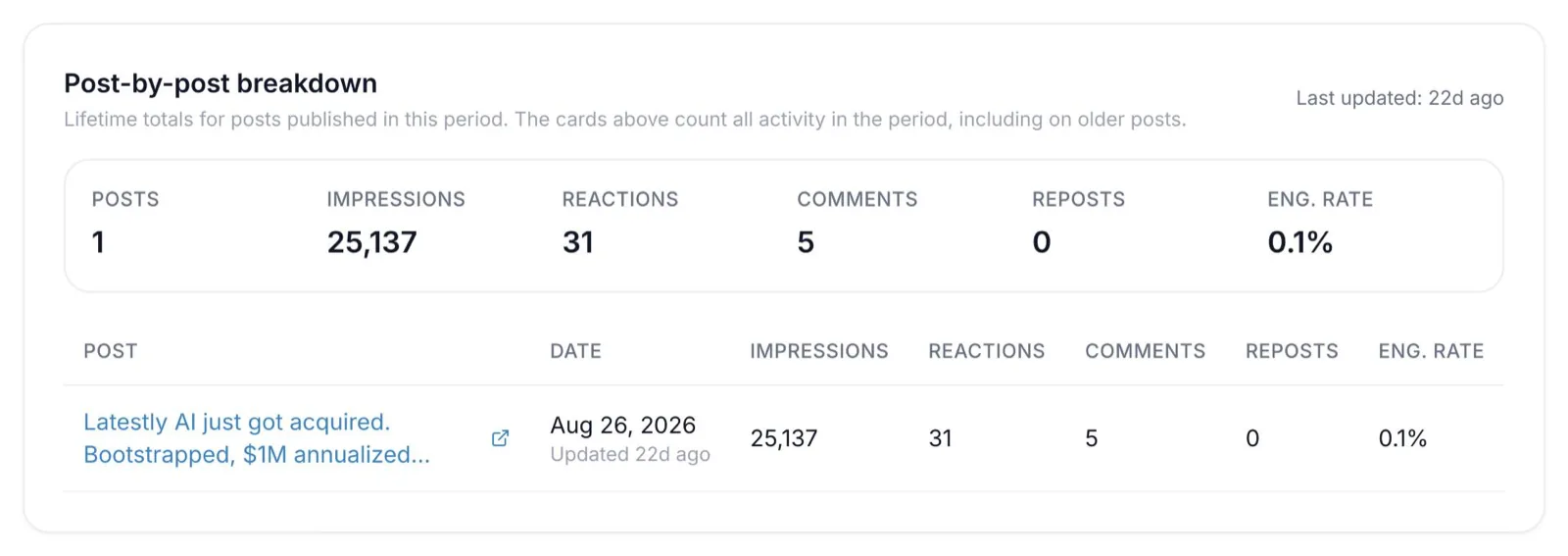
Utsav Patel’s two biggest posts of 2026 sat right in this range, at 872 characters (49,155 impressions) and 1,387 characters (25,137 impressions).
Long Posts For Stories And Frameworks
Posts of 1,500 to 2,000 characters work when you have a full story, a step-by-step process or a framework to share. At this length, the writing does the work, so a strong text-only post can perform as well as one with an image.
What Our Team Posts’ Data Shows
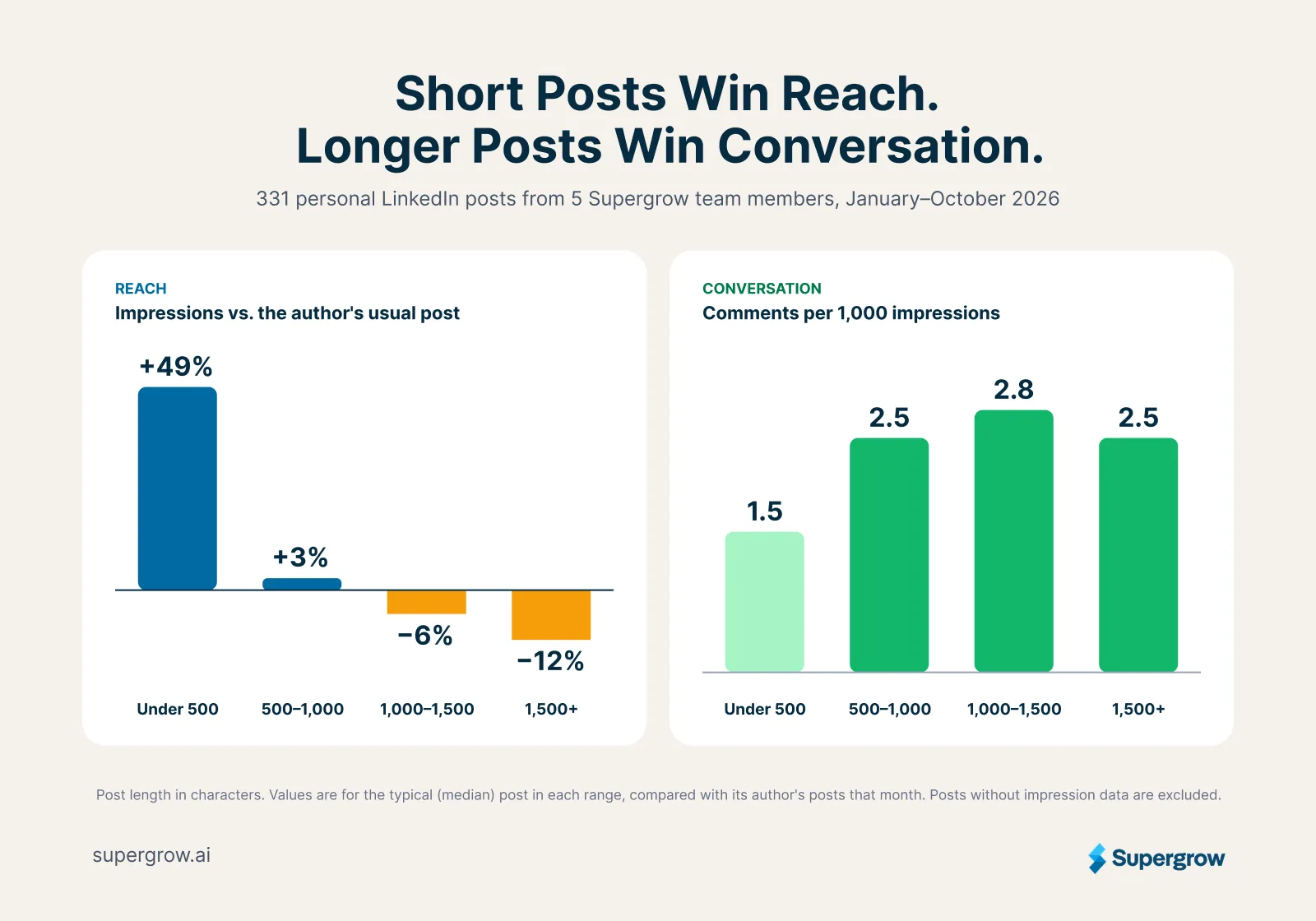
Across 331 personal posts from five Supergrow team members, published between January and October 2026, post length changed what a post was good at:
| Post length | Impressions vs. the author’s usual post | Comments per 1,000 impressions |
|---|---|---|
| Under 500 characters | +49% | 1.5 |
| 500 to 1,000 characters | +3% | 2.5 |
| 1,000 to 1,500 characters | −6% | 2.8 |
| Over 1,500 characters | −12% | 2.5 |
Short posts reached more people, while longer posts started more conversations with the people they reached. The median post was about 1,000 characters, and the longest was 2,484.
Pick The Length For Each Post
Use this as a quick guide when you sit down to write:
- One line plus a visual: reactions, observations and relatable moments.
- 500 to 1,500 characters: lessons, opinions and short how-tos.
- 1,500 to 2,000 characters: stories, case studies and frameworks.
- A LinkedIn article: anything that needs more than 3,000 characters.
Mixing all three lengths keeps your feed varied and gives your audience different ways to engage. Track your LinkedIn impressions over a few months to see which lengths and formats your own audience responds to most.
How to write within LinkedIn's character limit
3,000 characters is plenty for one clear idea. These habits help you use the space well:
- Open with the hook: give readers a reason to click "…more" within the first line or two.
- Keep paragraphs short: stick to one to three sentences, with a line break between ideas. On a phone, long blocks turn into a wall of text.
- Use lists when they help: number steps in order and use bullets for related tips.
- Add visuals with a purpose: a screenshot, a simple chart or a real photo backs up your point better than a stock image.
- Trim hashtags and links: two or three relevant hashtags and one short link leave more room for your idea.
Bold, Italics And Emoji
LinkedIn's post box has no bold or italic buttons. The styled text you see in posts is made of Unicode characters, which Supergrow's free LinkedIn Text Formatter creates for you while keeping track of your character count.
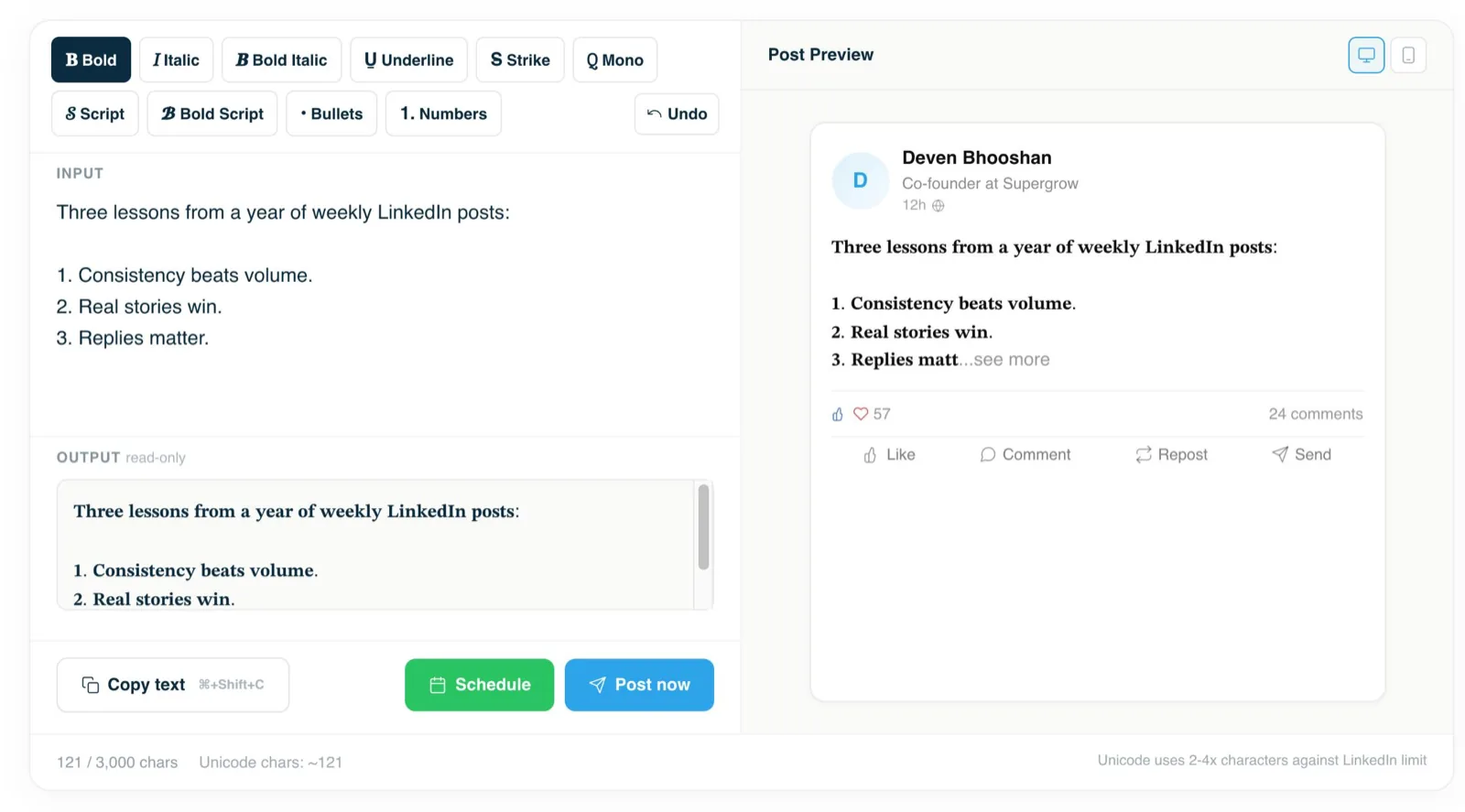
Use styling for a few key words, such as your hook or a key takeaway. It draws the eye without eating into your 3,000 characters.
When Your Post Runs Over 3,000 Characters
You have three options:
- Cut it: remove repeated points, long warm-ups and examples that don't support the main idea.
- Split it: turn one long post into a short series over several days, with each post standing on its own.
- Write an article: publish the full piece as a LinkedIn article, then share it with a short post that hooks readers in.
A clear process for writing a LinkedIn post makes this editing faster, because the hook, main point, supporting details and close each have a defined job.
Conclusion
You have 3,000 characters for every LinkedIn post, and your hook decides whether people read past the first few lines. Open strong, match the length to the idea, and keep every line working for the reader.
Supergrow helps you write those posts faster, in your own voice. PostCast interviews you about your work and turns the conversation into ready-to-edit drafts, and Content DNA keeps every draft sounding like you. You can also turn an article, PDF or YouTube video into a post, then run Check Score to grade your draft on Performance and Authenticity before it goes live. Start the 7-day free trial to create your next post with Supergrow.